 eCommerce with Zen Cart!
Checkout Candy for osCommerce Better Together
 An osCommerce™ mod which allows you to
present cross-selling or upselling offers on the shopping cart page and on the first page of
the checkout process. Suggestive selling is a proven technique
for increasing profits.
An osCommerce™ mod which allows you to
present cross-selling or upselling offers on the shopping cart page and on the first page of
the checkout process. Suggestive selling is a proven technique
for increasing profits.
Relevance: osCommerce™ 2.2 and 2.3
This extension is part of the osCommerce Better Together World.
Current Version: 1.0.
Cost: $30 for the Better Together upsell text.
(Note: this low price covers software only for self-installation.)

Would you like to ask me questions before buying? I'm happy to help likely purchasers make the right decision. Please use my contact form.
Installed Cost: $90.00 (Professional installation by That Software Guy)
Installation Difficulty: Moderate (Some file merging)
Installation Instructions: click here
Buy: Buy Checkout Candy!
Pre-purchase questions? No problem! Just Please contact me with your question.
Zen Cart User? This is an osCommerce page. Look at the Better Together for Zen Cart World for Zen Cart help.
Overview
Why do grocers put candy at the checkout stations? Because people buy it!Checkout Candy allows an osCommerce vendor an upselling opportunity at the two key decision points in the checkout process: when reviewing the cart and on the first page of checkout. The default upselling option for this module is Better Together.
Checkout Candy with Better Together
Like Better Together? Wish you could re-enforce the upsell message off the product info page? Checkout Candy has a Better Together fitting that shows only the unused discounts.This is different from the Better Together marketing information shown in the product information page because it shows the actual available discounts based on the current contents of the cart, not based on the hypothetical purchase of one particular item. For instance, if the mouse and keyboard are linked in Better Together, then displaying the mouse product info page will show the discount available when a keyboard is purchased. If the mouse is purchased, the shopping cart will show the keyboard discount - however, if the mouse and the keyboard are purchased, no discount will be shown on the shopping cart page, since the discount has already been taken.
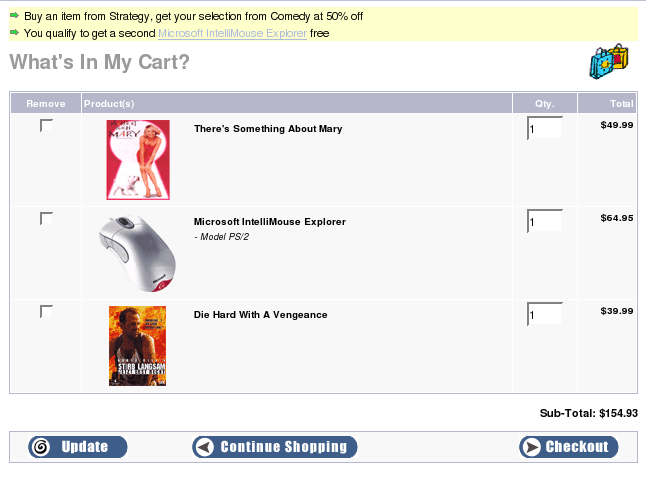
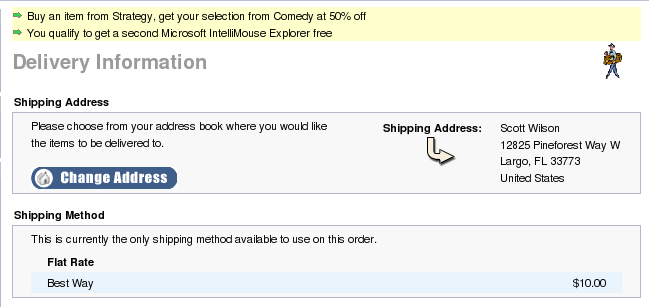
In the example below, we have linked items in the category Strategy with items in the category Comedy, and have provided a two for one discount on mice. So both these upselling messages are shown.
osCommerce 2.2 Shopping Cart Page Using Checkout Candy
osCommerce 2.2 Shipping Page Using Checkout Candy
osCommerce 3.0 Shopping Cart Page Using Checkout Candy

osCommerce 3.0 Shipping Page Using Checkout Candy

osCommerce 2.2 Installation Instructions:
These installation instruction are for osCommerce 2.2. Click here for osCommerce 3.0 installation instructions.- Back up everything! Try this in a test environment prior to installing it on a live shop.
- Copy the contents of the unzipped folder to the root directory of your
shop.
- Edit the file
catalog/shopping_cart.phpRight below where the body text table is created, add<?php require("checkout_candy.php"); ?>
So your file catalog/shopping_cart.php will look like:<!-- body_text //--> <td width="100%" valign="top"><?php echo tep_draw_form('cart_quantity', tep_href_link(FILENAME_SHOPPING_CART, 'action=update_product')); ?> <table border="0" width="100%" cellspacing="0" cellpadding="0"> <?php require("checkout_candy.php"); ?> - Edit the file
catalog/checkout_shipping.phpRight below where the body text table is created, add<?php require("checkout_candy.php"); ?>
So your file catalog/checkout_shipping.php will look like:<!-- body_text //--> <td width="100%" valign="top"><?php echo tep_draw_form('checkout_address', tep_href_link(FILENAME_CHECKOUT_SHIPPING, '', 'SSL')) . tep_draw_hidden_field('action', 'process'); ?> <table border="0" width="100%" cellspacing="0" cellpadding="0"> <?php require("checkout_candy.php"); ?>
osCommerce 3.0 Installation Instructions:
These installation instructions are for osCommerce 3.0. Click here for osCommerce 2.2 installation instructions.- Back up everything! Try this in a test environment prior to installing it on a live shop.
- Copy the contents of the unzipped folder to the root directory of your
shop.
-
Edit the file
templates/custom/content/checkout/shopping_cart.php
Right below where the first table is created, add<?php require("checkout_candy.php"); ?>So your file will look like:<div class="content"> <table border="0" width="100%" cellspacing="0" cellpadding="2"> <?php require("checkout_candy.php"); ?> -
Edit the file
templates/custom/content/checkout/checkout_shipping.php
At the top of the file, add<table width="100%"> <?php require("checkout_candy.php"); ?> </table>

I charge a fee of $30 for Checkout Candy for osCommerce.
Buy Now.
The fee covers software only; installation is extra if you require help.
The fee covers software only; installation is extra if you require help.