 eCommerce with Zen Cart!

Zen Cart Big Spender
A discounting module for Zen Cart™ that allows you to offer discounts at certain levels of spending.Background: See the Zen Cart Matrix-o-discounts
Example Discounts: I have provided several examples of Zen Cart Big Spender discounts.
Relevance: Zen Cart™ 1.5.x
Current Version: 1.4. Occasionally, new features are documented prior to being publicly available; please check the version history to ensure the feature you want is available in your version.
Support Thread: My commercial software is not supported on the Zen Cart forum. Please email me questions instead.
Cost: $60 (Note: this low price covers software only for self-installation.)

Would you like to ask me questions before buying? I'm happy to help likely purchasers make the right decision. Please use my contact form.
Installed Cost: $200.00 (Professional installation by That Software Guy)
Installation Difficulty: Moderate (You must write some PHP to configure this mod; there is no Admin panel)
Installation Instructions: click here
Tax Notes: Notes on tax handling
Buy: Buy Big Spender!
Pre-purchase questions? No problem! Just Please contact me with your question.
FAQ: click here
Configuration: The basic configuration of Big Spender involves adding PHP code to the setup() function in the module, as shown below. No admin panel is available. Many examples of basic configuration are shown in this help file; examples of advanced configuration are also available.
Marketing Text: click here
See it Live: Go to product 2 in my demo shop (or any other hardware item) you will see the upsell message that if you buy $200 or more of hardware, you get two free movies. Going to a DVD movie will show the same message.
The code that created this Big Spender Discount was:
         $this->add_threshold(200, 'Spend over $200 on <a href="index.php?main_page=index&cPath=1">hardware</a>, get two movies free', false);
            $this->set_constraint(CAT, 1);
            $this->set_choice_discount(2, CAT,3,"%",100);
Promotional Page: free from my website (you must buy Big Spender separately)
Add-Ons:
Big Spender is an order total module, so the discount is not visible until the second page of checkout. If you want to see the discount on the shopping cart page (or sidebox), look at Discount Preview.
For example, in my demo shop, if you buy enough hardware items to pass the $200 threshold and then add the movies to your cart, you will be able to see the discount in your cart because of Discount Preview.
Here is a sample of the Big Spender Discount promotional page, which is available for download here.
You can display your promotions on the shopping cart page and the checkout shipping page using Big Upsell.
The code that created the additional supporting text on the promotional page was:
            $this->set_support('Enjoy your new computer with your choice of two free movies');
            $this->set_support('We have many many choices - comedy, drama, action and cartoons');
            $this->set_support('Link to mfr: - <a href="http://www.intel.com" target="_blank">Intel</a>');
            $this->set_support('<a href="articles/Sample_PDF.pdf">Sample PDF document</a>');
This text may also be displayed on the product info page if desired.
Big Buy Now displays a Buy Now button next to any set_support_prod link, as long as the product does not have attributes and may be added from a listing page.
Bugs: click here
Overview:
My Quantity Discounts Contribution allows you to discount the purchase of specific quantities of items, where items can be grouped and counted in a number of ways. Every once in a while though, people ask me to modify the contribution to discount by dollars spent (typically with a few exceptions or exemptions). This is a modification which I do for $30.Increasingly, however, I have been receiving more complex requests for discounts based on dollars spent. Typically these are initiated after a certain dollar threshold is exceeded. The most common of these is, "provide a free gift after with purchases of a certain amount," or, "provide additional discounts on further purchases after a certain amount has been spent."
None of my existing modules is adequate for this task. This requires a new approach to specifying both conditions and discounts. Hence, Big Spender.
Big Spender Discount is modelled after my Combination Discounts extension. Combination Discounts introduced the idea of having a very flexible specification mechanism to allow the implementation of many different discounting models without the need for costly custom programming. Big Spender builds on this idea.
Big Spender is configured by setting "thresholds" and then parameterizing these thresholds, specifying the discounts available once the threshold is exceeded, and (optionally) specifying how the threshold is to be determined, if it is anything other than the total value of all cart items.
Big Spender requires you to add these thresholds and parameters to the module itself - they are not configured through the admin panel. This sounds complicated, but it's not that bad, and many examples of common discounting practices are provided. Please note that Big Spender only provides a discount; it does not automatically add items to the cart. If you need to automatically add your discounted items to the cart, take a look at Auto Add. (Note that several restrictions apply to Auto Add; please read the documentation carefully.)
The calling conventions for building a threshold are as follows:
{ dollar figure, text description, whether to apply the behavior multiple times }
So suppose the discount was stated as, "After $200 is spent, take some action." This would be
$this->add_threshold(200, "Spend over $200 and get ...", false);
If the discount was, "For every $200 spent, take some action," the code would be
$this->add_threshold(200, "For every $200 spent, get ...", true);
Now we need to parameterize the threshold. Parameter statements apply to the threshold statement they immediately follow. I have provided a visual cue for this by indenting the parameter statements on this page by three spaces. The following types of parameter statements are currently supported:
- set_choice_discount - discount a specified number of items from some product or category by a specific percentage or currency figure
- set_cart_discount - discount the entire cart (or just the items meeting the constraint) by a specific percentage or currency figure
- set_cart_discount_products - discount the product subtotal by a specific percentage or currency figure
- set_constraint - determine whether the threshold has been crossed by totalling the value of only the specified products or categories
- set_negative_constraint - determine whether the threshold has been crossed by totalling the value of all products except those specified
- set_support - provide additional information on the discount
- set_deal_id - giving the discount an identifying number to allow other discounts to be filtered out if this number has been run
- set_no_double_dip - specifying a discount which, if executed, will cause this discount to be skipped
- set_no_double_dip_list - specifying a list of discounts which, if executed, will cause this discount to be skipped
- set_discount - discount some product or category by a specific percentage or currency figure
- set_group - only apply this discount to members of the listed groups
- set_no_group - do not apply this discount to members of the listed groups
- set_min_items - apply this discount only if at least this many items are in the cart and meet the other criteria
- set_coupon - permits you to add a coupon condition to a discount
- set_constraint_regprice - specifies that items counted towards the threshold constraints must not be on sale or special
- set_cart_free_shipping- Rebate the amount charged for shipping as part of the Big Spender discount
- set_cart_discount_shipping- Rebate a portion of the amount charged for shipping as part of the Big Spender discount
One of set_discount(), set_choice_discount(), set_cart_discount() or set_cart_discount_products() must be done for every threshold for it to have any action. The use of set_constraint() is optional.
Examples
The discount, "Spend over $200, get a free product 5" would be specified as$this->add_threshold(200, "Spend over $200 and get a free name-of-product-5", false); $this->set_discount(PROD, 5, 1, "%", 100);
The discount, "For every $200 spent, get $20 off an item from category 7" would be specified as
   $this->add_threshold(200, "For every $200 spent, get $20 off an item from name-of-category-7", true);
      $this->set_discount(CAT, 7, 1, "$", 20);
Now let's add a constraint. The discount, "For every $200 spent from category 3, get two free items from category 7" would be specified as
   $this->add_threshold(200, "For every $200 spent from category 3, get two free items from category-7", true);
      $this->set_discount(CAT, 7, 2, "%", 100);
      $this->set_constraint(CAT, 3);
Now let's add choices. The discount, "For every $200 spent from category 3, get your choice of 2 free gifts from products 20, 25, 30, 35, or 40" would be specified as
   $this->add_threshold(200, "For every $200 spent from category 3, select 2 free gifts... ", true);
      $this->set_choice_discount(2, PROD, 20, "%", 100,
                                 PROD, 25, "%", 100,
                                 PROD, 30, "%", 100,
                                 PROD, 35, "%", 100,
                                 PROD, 40, "%", 100);
      $this->set_constraint(CAT, 3);
What if instead of category 3, you wanted to provide a discount for spending on certain types of products which were spread across categories. We'll call this product class "open stock cookware," and assume that it is made up of product ids 1, 3, 5, 11, 13, 19, 37, and 41. We'll only allow this discount to be offered once per order.
   $this->add_threshold(200, "Spend over $200 on open stock cookware, select 2 free gifts... ", false);
      $this->set_choice_discount(2, PROD, 20, "%", 100,
                                 PROD, 25, "%", 100,
                                 PROD, 30, "%", 100,
                                 PROD, 35, "%", 100,
                                 PROD, 40, "%", 100);
      $this->set_constraint(PROD, 1, PROD, 3, PROD, 5, PROD, 11, PROD, 13, PROD, 19, PROD, 37, PROD, 41);
Discounting can be done in currencies as well. To offer $5 off (or 5 of whatever currency your cart uses), instead of 100% off, use
   $this->add_threshold(100, "Spend over $100, select 2 free gifts... ", false);
      $this->set_choice_discount(2, PROD, 20, "$", 5,
                                 PROD, 25, "$", 5,
                                 PROD, 30, "$", 5,
                                 PROD, 35, "$", 5,
                                 PROD, 40, "$", 5);
(The "$" is just used to specify currency; your cart's currency settings will be respected when computing the discount.)
Constraints can be specified in the opposite manner; to total all items in the cart except for gift certificates (category 21), use set_negative_constraint():
   $this->add_threshold(100, "Spend over $100 (excluding gift certificates), get a free product 20", false);
      $this->set_negative_constraint(CAT, 21);
      $this->set_discount(PROD, 20, 1, "%", 100);
The discount, "Spend over $200, get 20% off one item priced at $100 or more" would be specified as
   $this->add_threshold(200, "Spend over $200, get 20% off one item $100 or more", false);
      $this->set_discount(MINPRICE, 100, 1, "%", 20);
The discount, "Spend over $200 on items by manufacturer ABC, get a free product 20" would be specified as
   $this->add_threshold(200, "Spend over $200 on items from manufacturer ABC, get a free product 20", false);
      $this->set_constraint(MANUF, 7);
      $this->set_discount(PROD, 20, 1, "%", 100);
(assuming the manufacturer id of ABC was 7.)
The discount, "Get 20% off on items by manufacturer ABC" would be specified as
   $this->add_threshold(1, "20% off items from manufacturer ABC", true);
      $this->set_constraint(MANUF, 7);
      $this->set_discount(MANUF, 7, "*", "%", 20);
(again assuming the manufacturer id of ABC was 7.)
Discounts can also be limited to certain groups using set_group():
   $this->add_threshold(100, "Spend over $100, get a free product 20", false);
      $this->set_group(1,3,7);
      $this->set_discount(PROD, 20, 1, "%", 100);
A free shipping discount can be provided for specific purchases, using the constraint mechanism (only counting certain products, categories, manufacturers, etc.)
   $this->add_threshold(100, "Spend over $100 in category 1, get free shipping", false);
      $this->set_constraint(CAT, 1);
      $this->set_cart_free_shipping();
If the free shipping discount is for a specific shipping module choice only (say "flat"), you can specify this in the call to `set_cart_free_shipping`.
   $this->add_threshold(100, "Spend over $100 in category 1, get free flat rate shipping", false);
      $this->set_constraint(CAT, 1);
      $this->set_cart_free_shipping("flat");
Alternately, a shipping discount can be provided for specific purchases, using the constraint mechanism (only counting certain products, categories, manufacturers, etc.)
   $this->add_threshold(100, "Spend over $100 in category 1, get 50% off shipping", false);
      $this->set_constraint(CAT, 1);
      $this->set_cart_discount_shipping("%", 50);
You may also discount only certain types of shipping. For instance,
if you wanted to discount Per Item shipping (but not, say, UPS),
you'd use
   $this->add_threshold(100, "Spend over $100 in category 1, get 50% off per item shipping", false);
      $this->set_constraint(CAT, 1);
      $this->set_cart_discount_shipping("%", 50, 'item');
And you can combine shipping and product discounts.
   $this->add_threshold(100, "Spend over $100 in category 1, get 10% off your order and $20 off shipping", false);
      $this->set_constraint(CAT, 1);
      $this->set_cart_discount("%", 10);
      $this->set_cart_discount_shipping("$", 20);
Discounts can be made to require the purchase of a minimum number of items:
   $this->add_threshold(100, "Spend over $100 on at least 3 items, get a free product 20", false);
      $this->set_min_items(3);
      $this->set_discount(PROD, 20, 1, "%", 100);
Discounts can be applied to the cart's total value:
   $this->add_threshold(100, "Spend over $100 on category 2, get 20% off your entire purchase", false);
      $this->set_constraint(CAT, 2);
      $this->set_cart_discount("%", 20);
Discounts can be applied to the items that allowed you to cross the threshold.
   $this->add_threshold(100, "Spend over $100 on category 2, get 20% off those items", false);
      $this->set_constraint(CAT, 2);
      $this->set_cart_discount("%", 20, CART_DISCOUNT_CONSTRAINTS_ONLY);
Or, discounts can be applied to the product subtotal:
         $this->add_threshold(500, 'Spend over $500, get 30% off', false);
         $this->set_cart_discount_products("%",30);
         $this->set_deal_id(500);

         $this->add_threshold(250, 'Spend over $250, get 25% off', false);
         $this->set_cart_discount_products("%",25);
         $this->set_deal_id(250);
         $this->set_no_double_dip_list(500);

         $this->add_threshold(100, 'Spend over $100, get 20% off', false);
         $this->set_cart_discount_products("%",20);
         $this->set_deal_id(100);
         $this->set_no_double_dip_list(500,250);

         $this->add_threshold(50, 'Spend over $50, get 20% off', false);
         $this->set_cart_discount_products("%",20);
         $this->set_deal_id(50);
         $this->set_no_double_dip_list(500,250,100);
When set_cart_discount_products is used, additional filtering of
products may be added using the cart_filter_product() function.
You can have different discounts on different products:
         $this->add_threshold(100, 'Spend over $100, get $10 off each hardware item and $5 off each movie', false);
         $this->set_discount(CAT, 1, '*', "$",10);
         $this->set_discount(CAT, 3, '*', "$",5);
Sometimes you may wish to tier your discounts
   $this->add_threshold(500, "Spend $500 get five free product 20", false);
      $this->set_discount(PROD, 20, 5, "%", 100);
   $this->add_threshold(100, "Spend $100 get a free product 20", false);
      $this->set_discount(PROD, 20, 1, "%", 100);
Big Spender does not know that these are related, so this would allow someone spending over $500 to take six free product 20. To indicate that discounts are exclusive, use set_deal_id() and set_no_double_dip().
   $this->add_threshold(500, "Spend $500 get five free product 20", false);
      $this->set_discount(PROD, 20, 5, "%", 100);
      $this->set_deal_id(1);
   $this->add_threshold(100, "Spend $100 get a free product 20", false);
      $this->set_discount(PROD, 20, 1, "%", 100);
      $this->set_no_double_dip(1);
Note that when this is done, the highest discount should be specified first; otherwise, a lower discount will block a higher discount.
A set_no_double_dip() on the first threshold and a set_deal_id() on the last are not required but may be specified; the above block is identical to this:
   $this->add_threshold(500, "Spend $500 get five free product 20", false);
      $this->set_discount(PROD, 20, 5, "%", 100);
      $this->set_deal_id(1);
      $this->set_no_double_dip(2);
   $this->add_threshold(100, "Spend $100 get a free product 20", false);
      $this->set_discount(PROD, 20, 1, "%", 100);
      $this->set_deal_id(2);
      $this->set_no_double_dip(1);
These thresholds and parameters are not only used in discount calculations; they are also used to create messages which are automatically displayed on the product_info page. Details on how to do this are provided in marketing.
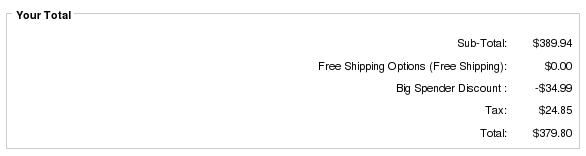
Big Spender is an order total module, so it appears on the second page of your checkout as a discount (unless Discount Preview is used, which allows the discount to be shown in the cart).
Payment Page displaying Big Spender Discount
Detailed Description:
Thresholds and parameters are specified in the setup() method at the bottom of the file
includes/modules/order_total/ot_bigspender_discount.php
There is no admin interface; you must modify the file directly.
Any number of these discounts may be offered; discount computation will be done in the following order:
- Thresholds are calculated in the order in which they are specified in setup()
- For each threshold, the set_discount() and set_cart_discount() statements are executed first (in the order they were specified), then the set_choice_discount() statements (in the order they were specified)
- Once an item has been discounted, it is not subject to re-discounting, even if rules would permit it
- Items in the cart are discounted from least expensive to most expensive.
To make these discounts visible on your product info page, customize the file
includes/templates/template_default/templates/tpl_product_info_display.php
as described in marketing below in the installation instructions.
This step will display the message you provided in the add_threshold()
command:
For every $200 spent on open stock cookware, select 2 free gifts ...
The message is displayed to encourage the customer to cross the threshold. It is displayed on any item which will contribute to crossing the threshold *and* any item which is discounted after crossing the threshold.
This step is optional; if you prefer, you can add your own marketing text.
Category Handling
Note that CAT has different semantics in Big Spender when compared to Better Together. In Better Together, CAT only includes items directly below the specified category (i.e. CAT means "parent category" based on the master_categories_id field in the products table). In Big Spender, CAT includes all items in the specified category, whether they are directly below or in subcategories.
Men's Clothing (category 3)
     |
     ---->  Shirts (category 5)
     |      |
     |      -------> shirt A
     |               shirt B
     |               shirt C
     ---->  Pants (category 6)
     |      |
     |      -------> pants A
     |               pants B
     |               pants C
     ---->  Shoes (category 7)
            |
            --->  Dress Shoes (category 12)
            |     |
            |     -------> dress shoes A
            |              dress shoes B
            |              dress shoes C
            --->  Casual Shoes (category 18)
                  |
                  -------> casual shoes A
                           casual shoes B
                           casual shoes C
Specifying "Men's Clothing" as a category in Big Spender will
include all items in Shirts, Pants and Shoes.
Better Together.
Specifying "Shoes" (CAT 7) as a category in Big Spender will include both dress shoes and casual shoes.
Note that "parent category id" is determined using the master_categories_id field from the products table. So if casual shoes A is also linked into a category called "Hot Products," the parent category is still category 18 (Casual Shoes). For more details on category handling in Big Spender, please see the Category Issues page.
Because of the ability to specify categories in both the negative and positive manner, you can create a discount which is triggered by spending over $100 on Men's Clothing, excluding shoes:
   $this->add_threshold(100, "Spend over $100 on Men's clothing (excl. shoes), get a free product 20", false);
      $this->set_constraint(CAT, 3);
      $this->set_negative_constraint(CAT, 7);
      $this->set_discount(PROD, 20, 1, "%", 100);
The discount could also be on the purchased items:
   $this->add_threshold(100, "Spend over $100 on Men's clothing (excl. shoes), get 5% off purchases in that category", false);
      $this->set_constraint(CAT, 3);
      $this->set_negative_constraint(CAT, 7);
      $this->set_discount(CAT, 3, '*', "%", 5);
You can also choose to include the spending from the category in the threshold calculation, but exclude it from the discount:
   $this->add_threshold(100, "Spend over $100 on Men's clothing, get 5% off the category (discount excludes shoes)", false);
      $this->set_constraint(CAT, 3);
      $this->set_discount(CAT, 3, '*', "%", 5);
      $this->set_no_discount(CAT, 7);
You can also use set_no_discount to provide across the board discounts excluding one category. The next 3 examples will demonstrate the flexibility of Big Spender.
To offer 10% off all items when purchasing over $100, you could use:
   $this->add_threshold(100, "Spend over $100, get 10% off your purchase", false);
      $this->set_discount(MINPRICE, 0.01, '*', "%", 10);
To exclude category 5 from the discount and the calculation of the threshold of $100, you could use:
   $this->add_threshold(100, "Spend over $100 (excluding category 5 purchases), get 10% off your purchase", false);
      $this->set_discount(MINPRICE, 0.01, '*', "%", 10);
      $this->set_negative_constraint(CAT, 5);
To exclude category 5 from the discount but include it in the calculation of the threshold, you could use:
   $this->add_threshold(100, "Spend over $100, get 10% off your purchase (excluding category 5)", false);
      $this->set_discount(MINPRICE, 0.01, '*', "%", 10);
      $this->set_no_discount(CAT, 5);
How Discounts are Selected
The basic operation of all my "Buy X, Get Y at a discount" modules is the same:- sort from most expensive to least;
- pick off the most expensive matching item(s) for the condition (the item(s) which must be purchased to get the discount)
- pick off the least expensive matching item(s) to discount
- remove the matching items from further consideration by this module (unless some sort of override exists)
Big Spender chooses conditions and discounting items using the same rules as Big Chooser.
Installation Instructions:
- Back up everything! Try this in a test environment prior to installing it on a live shop.
- Copy the contents of the unzipped folder to the root directory of your
shop.
The names of these files reflect a template name of "custom." If you are using a different template name, please change file paths using "custom" to use your template name instead. Note: If you are using Zen Cart 1.5.5 or higher, your template name will be "responsive_classic" if you have not changed it. - Login to Admin and in Modules > Order Total you will see 'Big Spender Discount' listed along with all the other modules available.
- Click on 'Big Spender Discount' to highlight the module and click on 'Install'
- Decide on the discounts you wish to use. The easiest way to do this
is to open a shopping cart in another window, and just start adding
discounts to the setup() method of
includes/modules/order_total/ot_bigspender_discount.phpThe discounts are shown on the second step of checkout in "Your Total" under "Big Spender Discount." - You may wish to use a less silly name than "Big Spender Discount."
If so, modify the file
includes/languages/english/modules/order_total/ot_bigspender.php - If you wish, follow the guidelines in marketing to advertise your discounts.
- Light a cigar with a $100 bill. You are now a Big Spender!
Optional Installation Instructions:
- I highly recommend Discount Preview with all my discounting modules. Without Discount Preview, your customers cannot see the price reductions they are entitled to until the second page of checkout (checkout confirmation). Obviously this is a disadvantage, particularly for new customers who need to go through the additional step of creating an account before they can see this information. Sometimes seeing is believing, so here's a video showing Discount Preview in action.
Marketing
What good is having cross selling and upselling specials if you don't advertise them?Big Spender Discounts may be automatically displayed in two places: on the product info page, and on a separate promotional page. We'll talk about the product info page first.
Customize the tpl_product_info_display.php file to advertise your discounts. Copy the file
includes/templates/template_default/templates/tpl_product_info_display.php
into
includes/templates/<YOUR_TEMPLATE>/templates
Then add this block of code to the new copy of
tpl_product_info_display.php:
<?php
require($template->get_template_dir('/tpl_bigspender_marketing.php',DIR_WS_TEMPLATE,
   $current_page_base,'templates'). '/tpl_bigspender_marketing.php');
?>
The placement of this code is a matter of personal preference;
try placing it below the product description and adjust to your tastes.
It creates a message on your page that uses the description you
provided in the add_threshold():
For every $200 spent on open stock cookware, select 2 free gifts ...
Only one div block of text will be produced, with the div id bigSpenderDiscountPolicy.
The file
tpl_bigspender_marketing.php also contains additional print statements which are commented out, but which you may uncomment if desired. These include:
- An indication of whether this product contributes towards reach the threshold and/or is discounted after the threshold is reached
- The display of additional "supporting" text for the discount that you have added using $this->set_support(). Such text can include links to PDFs, links to products in your cart, links to external pages, or simply descriptive text. This text will be automatically displayed on the Big Spender Discount promotional page.
Styling this block of text (changing font, color, etc.) is simply a matter of adding to your stylesheet
#bigSpenderDiscountPolicy {
   font-size: 200%;
   color: #ff0000;
}
This would give you
For every $200 spent on open stock cookware, select 2 free gifts ...
Probably a bit more obnoxious than you would truly want, but you get the idea.
Alternately, you could modify the marketing text template (tpl_bigspender_marketing.php) and put the text into a fieldset:
The approach to marketing text for Big Spender is different than the one used in Better Together or Combination Discounts, in that it is not triggered by a particular product. Instead, it is globally displayed on all product info pages with the following conditions:
- It will not be displayed if that product is constrained out of the discount (unless it is the discounted product).
- It will not be displayed if there are constraints and the product does not meet the constraints (unless it is the discounted product).
- It will always be displayed if it is the discounted product
   $this->add_threshold(100, "Spend over $100 on Men's clothing (excl. shoes), get a free product 20", false);
      $this->set_constraint(CAT, 3);
      $this->set_negative_constraint(CAT, 7);
      $this->set_discount(PROD, 20, 1, "%", 100);
then the marketing text will appear on pages for products in category 3 (and subcategories), and on the page for product 20, but not on pages in category 7 (and subcategories). If the two constraints were not specified, the marketing text would appear on all product info pages. Note that price based constraints are not used to filter out marketing text because the final price of a product may not be known on the product info page.
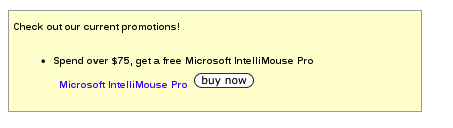
The other available marketing vehicle is the Big Spender Discount promotional page. This page is completely optional; it is not included in the bigspender.zip file, but it is a free download from my website for people who have purchased Big Spender. It creates a new page on your site that looks like this, displaying all discounts and supporting text.
This new page can be accessed via the URL
YOURSITE.com/index.php?main_page=bigspender_promoA link to this page may be added to the categories sidebox, the site footer, or the main page content for your site. See Promotional Pages for more information and ideas.
Big Buy Now displays a Buy Now button next to any set_support_prod link, as long as the product does not have attributes and may be added from a listing page.
Notes on Taxes
If you don't use embedded taxes, and don't have a mix of taxable and tax-free products, and don't have a different rate of tax for shipping, please skip this section.
However, if you any of the above apply to you, please read my Notes on Taxes.
Be sure that the sort order for the Tax module (set in Admin->Modules->Order Total->Tax) is greater than the largest order total sort order, so that your taxes are shown after all discounts. 399 is a good value for most stores.
Files
(new)  includes/languages/english/modules/order_total/ot_bigspender_discount.php
(new)  includes/modules/order_total/ot_bigspender_discount.php
(new)  includes/templates/custom/templates/tpl_bigspender_marketing.php
Formal Syntax of Thresholds and Parameters
Thresholds and Parameters, which are specified in the setup() function of ot_bigspender_discount.php, are the mechanism for configuring a store's discounts.Thresholds
Discounts always begin by specifying a spending threshold. All subsequent parameters (until the next threshold) apply to this threshold.
$this->add_threshold(<amount>,<description>,<repeatable>);
where:
| amount | is the cart total above which the discounts apply |
| description | Is a textual description of the discount. This description is not automatically created the way it is in Better Together or Combination Discounts; it must be added manually. The reason for this is to allow greater flexibility |
| repeatable | is a boolean flag indicating whether to apply the discount only one time (false) or as many times as possible (true). |
Parameters - set_discount
The set_discount() command specifies the items or categories whose prices should be reduced if the threshold has been met.
$this->set_discount(<discount 1>[,<discount 2>,...,<discount n>]);
where:
| discount | is the string PROD, CAT, PRICE, MINPRICE or MANUF, followed by an identifier
(product or category id, product price or manufacturer id),
followed by a quantity, followed by a percent or dollar sign, followed by an amount
<PROD | CAT | PRICE | MINPRICE | MANUF> <product or category identifier or price> <item count> < "$" | "%" > <discount amount>
The item_count may be specified as "*", meaning "the discount may be taken an unlimited number of times." |
See also set_no_discount.
Parameters - set_no_discount
The set_no_discount() command specifies the items or categories which should be excluded from any set_discount price reductions in this offer.
$this->set_no_discount(<excluded_purchase 1>[,<excluded_purchase 2>,...,<excluded_purchase n>]);
where:
| excluded_purchase | is the string PROD, CAT, PRICE, MINPRICE, or MANUF, followed by an identifier (product or category id, or product price)
<PROD | CAT | PRICE | MINPRICE | MANUF> <product or category identifier or price>
|
See also set_negative_constraint.
Items listed in the set_no_discount command are included in calculating the threshold total (assuming they meet the constraints, if any), but are not eligible for set_discount deductions. This is useful when set_discount lists a parent category with many subcategories, but a few specific items in the subcategories are excluded from discounting.
Parameters - set_cart_discount
The set_cart_discount() command specifies the reduction in the total cart price that should be done if the threshold has been met.
$this->set_cart_discount(<"$"|"%">, <discount_amount>, [discount_application]);
where:
| discount_amount | is a percent or dollar sign, followed by an amount |
| discount_application | defaults to applying the discount to the final cart total, but can be set to CART_DISCOUNT_CONSTRAINTS_ONLY if you only want to discount the items that met the constraints. This allows you to offer a "package discount" by percentage or dollars off. See more details below. |
Advanced feature: most people want the cart discount to apply to the entire cart, but some people wanted the discount to only apply to the items that met the constraints. For these people, the optional 3rd parameter to set_cart_discount may be added, and set to CART_DISCOUNT_CONSTRAINTS_ONLY.
$this->set_cart_discount("%", 25, CART_DISCOUNT_CONSTRAINTS_ONLY);
Doing so will only discount the price of the constraints, not the entire cart.
This feature was added in Big Spender 1.2.8.
One issue to be aware of with set_cart_discount is that since the discount is applied against the final cart total (by default, unless CART_DISCOUNT_CONSTRAINTS_ONLY is used), and the final cart total is not known until the payment page of checkout, Discount Preview will be unable to correctly show the discount on the shopping cart page if used.
Note that the set_cart_discount ignores set_no_discount statements; set_no_discount is only used in conjunction with set_discount.
Parameters - set_cart_discount_products
The set_cart_discount_products() command specifies the reduction in the subtotal that should be done if the threshold has been met.
$this->set_cart_discount_products(<"$"|"%">, <discount_amount>);
where:
| discount_amount | is a percent or dollar sign, followed by an amount. (Note that it almost always make sense to use this with "%".) |
Advanced feature: additional filtering of products may be added using the cart_filter_product() function. Products may be filtered out by product id, master category, top level category or manufacturer. This feature was added in Big Spender 1.2.17.
Parameters - set_choice_discount
The set_choice_discount() command specifies that the customer may choose between a series of discounts if the threshold has been met.
$this->set_choice_discount(<count><choice 1>,<choice 2>[,...,<choice n>]);
where:
| count | is the number of discounts the customer will receive; it must be a numeric quantity |
| choice | is the string PROD, CAT, PRICE, MINPRICE or MANUF, followed by an identifier
(product or category id, product price or manufacturer id),
followed by a percent or dollar sign, followed by an amount Note that this is different from the discount specified in set_discount because no explicit quantity is specified per choice; the quantity set at the level above.
<PROD | CAT | PRICE | MINPRICE | MANUF> <product or category identifier or price> < "$" | "%" > <discount amount>
|
Parameters - set_constraint
The set_constraint() command specifies the items whose prices are used to determine if the threshold has been met. If this command is not specified, the total price of all items in the cart is used.
$this->set_constraint(<qualifying_purchase 1>[,<qualifying_purchase 2>,...,<qualifying_purchase n>]);
where:
| qualifying_purchase | is the string PROD, CAT, PRICE, MINPRICE, or MANUF, followed by an identifier (product or category id, or product price)
<PROD | CAT | PRICE | MINPRICE | MANUF> <product or category identifier or price>
|
Parameters - set_negative_constraint
The set_negative_constraint() command specifies the items whose prices are NOT used to determine if the threshold has been met. If this command is not specified, the total price of all items in the cart (which meet the constraints, if any) is used.
$this->set_negative_constraint(<excluded_purchase 1>[,<excluded_purchase 2>,...,<excluded_purchase n>]);
where:
| excluded_purchase | is the string PROD, CAT, PRICE, MINPRICE, or MANUF, followed by an identifier (product or category id, or product price)
<PROD | CAT | PRICE | MINPRICE | MANUF> <product or category identifier or price>
|
See also set_no_discount.
NOTE: A negative constraint does not mean "the item must not be in the cart;" it simply means "the item is not counted towards the reaching the total."
Parameters - set_support
The set_support() command provides additional supporting text to describe your promotion. It is completely optional.
$this->set_support(<text>);
where:
| text | is a text string, which can be plain text or a link |
These strings are displayed on your promotional page, and optionally, on your product info page if you customize the file
includes/templates/custom/templates/tpl_bigspender_marketing.php
They can also be shown on your shopping cart and checkout shipping pages
using Big Upsell.
If you wish to add a message providing a link to a product in your discount, look at set_support_prod below.
Parameters - set_support_prod
The set_support_prod() command allows to to display a link directly to a product used in your discount. It's a shortcut for
$this->set_support('<a href="' . zen_href_link(zen_get_info_page(prid), 'products_id='. prid) . '">' .
     zen_get_products_name(prid) .  '</a>');
$this->set_support_prod(<prid>);
where:
| prid | is the product id |
| text | is optional anchor text, if you do not wish to use the product's name. |
These strings are displayed on your promotional page, and optionally, on your product info page if you customize the file
includes/templates/custom/templates/tpl_bigspender_marketing.php
They can also be shown on your shopping cart and checkout shipping pages
using Big Upsell.
In addition, Big Buy Now (sold separately) displays a Buy Now button next to any set_support_prod link, as long as the product does not have attributes and may be added from a listing page.
The set_support_prod command was added in version 1.2.14.
Parameters - set_deal_id
The set_deal_id() command allows you to give a threshold and its associated discount an id, to allow later discounts to be filtered out if this discount has been run using set_no_double_dip. This parameter is optional and is only needed for discounts which preclude other discounts.
$this->set_deal_id(<nnnn>);
where:
| nnnn | is some number which identifies this threshold or group of thresholds. |
For convenience, use the same id for all members of a related group of thresholds ("Spend $1000, get..", "Spend $500, get ...", "Spend $250, get ...") where you only want the highest value discount to be executed.
Parameters - set_no_double_dip
The set_no_double_dip() command allows you to give a specify that if a certain discount has already been run, the current discount should be skipped. This parameter is optional and is only needed for discounts which preclude other discounts.
$this->set_no_double_dip(<nnnn>);
where:
| nnnn | is the id which was used in a set_deal_id() command for one or more previous thresholds. |
Multiple set_no_double_dip commands may be used as required.
See also set_no_double_dip_list() and one_discount_only() below.
Parameters - set_no_double_dip_list
The set_no_double_dip_list() command allows provide a list of discounts which are mutually exclusive. So instead of
         $this->set_no_double_dip(500);
         $this->set_no_double_dip(250);
         $this->set_no_double_dip(100);
you can do
$this->set_no_double_dip_list(500,250,100);
$this->set_no_double_dip_list(<nnnn>,...,<nnnn>);
where:
| nnnn | is an id which was used in a set_deal_id() command for one or more previous thresholds. |
See also one_discount_only() below, and set_no_double_dip() above.
Parameters - one_discount_only
The one_discount_only() command allows you to stop discounting after the first discount is granted. This saves you from having to set deal_id and do set_no_double_dip through a number of related discounts if you wish to grant only one.
$this->set_one_discount_only();
The one_discount_only command was added in version 1.2.15.
Parameters - set_cart_free_shipping
The set_cart_free_shipping() command specifies that the order shipping charge be added to the Big Spender discount. By default, any shipping method will be discounted, but if only specific methods are to be discounted, they can be added as parameters.
$this->set_cart_free_shipping([<shipping method 1>,...,<shipping method n>]);
where:
| shipping_method | (if specified) is the shipping method which will be rebated.
Shipping methods should be specified using their class name
('ups', 'flat', 'usps', etc.)
|
Notes:
- This command is only supported in Zen Cart 1.3.8 and above. Additionally, filtering shipping methods is not compatible with Ceon Advanced Shipper; if you use this mod, you must discount ALL shipping methods.
- Only ONE set_cart_free_shipping() or set_cart_discount_shipping() command will apply to the order, and they are processed in the order specified in the setup function.
- Discount Preview will not show this discount until a shipping method has been selected, and will show the discount calculated against the last amount selected.
Parameters - set_cart_discount_shipping
The set_cart_discount_shipping() command specifies that a portion of the order shipping charge be added to the Big Spender discount. By default, any shipping method will be discounted, but if only specific methods are to be discounted, they can be added as parameters.
$this->set_cart_discount_shipping("$|%", $amount [,<shipping method 1>,...,<shipping method n>]);
where:
| amount | is percent or dollar amount to be of the discount, up to the total price of shipping |
| shipping_method | (if specified) is the shipping method which will be rebated.
Shipping methods should be specified using their class name
('ups', 'flat', 'usps', etc.)
|
Notes:
- This command is only supported in Zen Cart 1.3.8 and above. Additionally, filtering shipping methods is not compatible with Ceon Advanced Shipper; if you use this mod, you must discount ALL shipping methods.
- The amount is capped at the total cost of shipping. Specifying
$this->set_cart_discount_shipping("$", 20);when shipping is $10 will result in a $10 discount. - Only ONE set_cart_free_shipping() or set_cart_discount_shipping() command will apply to the order, and they are processed in the order specified in the setup function.
- Discount Preview will not show this discount until a shipping method has been selected, and will show the discount calculated against the last amount selected.
Parameters - set_group
The set_group() command specifies that the discount is only available to members of the listed group(s).
$this->set_group(<group 1>[,<group 2>,...,<group n>]);
where:
| group | is the group eligible to receive the discount |
Parameters - set_no_group
The set_no_group() command specifies that the discount is not available to members of the listed group(s).
$this->set_no_group(<group 1>[,<group 2>,...,<group n>]);
where:
| group | is the group which is not eligible to receive the discount |
The set_no_group command was added in version 1.2.9.
Parameters - set_min_items
The set_group() command specifies that the discount is only available to if a certain number of items or more are purchased and meet the other discount requirements.
$this->set_min_items(<nnnn>);
where:
| nnnn | is the minimum number of items required to get the discount. |
Parameters - set_coupon
Require a coupon in order to use the discount.
$this->set_coupon(<coupon-code>);
Note: To prevent interoperability problems with the rest of Zen Cart, I strongly recommend that coupons created for use with Big Spender either use a Coupon Amount of 0.01 or set the Free Shipping checkbox.
If you create a coupon with Coupon Amount 0.00 (and no free shipping), then the Uses per Coupon and Uses per Customer functionality will not work properly (as of 1.3.7), and other things may break in the future.
The set_coupon command was added in version 1.2.1.
For a more detailed explanation of how to use Coupons with Big Spender and Big Chooser, please see my Zen Cart Coupon Extensions page.
Parameters - set_auto_coupon
Require an automatically generated coupon (created by Spender AutoCoupon or Chooser AutoCoupon) in order to use the discount.
$this->set_auto_coupon(<new-coupon-name>);
The set_auto_coupon command was added in version 1.2.1.
Parameters - set_constraint_regprice
Require items counted towards the constraint not be on sale or special.
$this->set_constraint_regprice();
Parameters - set_wholesale_level
The set_wholesale_level() command specifies that the discount is only available to members of the listed wholesale level(s), as defined by the Dual Pricing mod. (Please note that I do not support the Dual Pricing mod; this is just a way to access the data which it uses. Support for dual pricing is on the Zen Cart forum.)
$this->set_wholesale_level(<wholesale 1>[,<wholesale 2>,...,<wholesale n>]);
where:
| wholesale | is the wholesale level which is not eligible to receive the discount |
The set_wholesale_level command was added in version 1.2.10.
Major Versions
- Version 1.4 - 02/12/22 - PHP 8.
- Version 1.3 - 12/21/18 - PHP 7.
- Version 1.2.17 - 02/07/16 - Added set_cart_discount_products (with cart_filter_product) and set_no_double_dip_list.
- Version 1.2.16 - 11/17/14 - Fixed issue with cart total discounts which was introduced in 1.2.15
- Version 1.2.15 - 07/01/13 - Add one_discount_only
- Version 1.2.14 - 03/01/13 - Add set_support_prod and support for Big Buy Now, Code Inspection
- Version 1.2.13 - 02/01/12 - Added VAT setting for tax recalculation
- Version 1.2.12 - 08/01/11 - Added set_no_discount
- Version 1.2.11 - 06/01/11 - Added set_cart_free_shipping, set_cart_discount_shipping commands
- Version 1.2.10 - 03/26/11 - Added set_wholesale_level command
- Version 1.2.9 - 06/04/10 - Added set_no_group command
- Version 1.2.8 - 05/12/10 - Added extra parameter to set_cart_discount, plus private features set_constraint_field, set_max_discount, add_threshold 4th parameter
- Version 1.2.7 - 04/30/10 - Resolved issues with unlimited quantities
- Version 1.2.6 - 02/17/10 - Array processing for some constraints (private feature)
- Version 1.2.5 - 12/01/09 - Added set_constraint_regprice
- Version 1.2.4 - 04/24/09 - Fix for repeatable discounts
- Version 1.2.3 - 02/22/09 - Issues with unlimited iterations on set _discount
- Version 1.2.2 - 12/18/08 - Fixed MANUF constraint
- Version 1.2.1 - 10/04/08 - Added set_coupon, set_auto_coupon
- Version 1.2.0 - 08/19/2008 - Added MANUF
- Version 1.1.7 - 02/09/2008 - Marketing text improvements
- Version 1.1.6 - 01/10/2008 - Fixes for set_discount limits
- Version 1.1.5 -11/14/2007 - Added set_cart_discount.
- Version 1.1.4 - 10/18/2007 - Added set_group, set_min_items, MINPRICE.
- Version 1.1.3a - 09/18/2007 - Fixes for Google Checkout.
- Version 1.1.3 - 09/08/2007 - Sort cart by price and discount least expensive items first.
- Version 1.1.2 - 09/01/2007 - Add protection against double dipping (set_deal_id, set_no_double_dip).
- Version 1.1.1 - 08/29/2007 - Added promotional page.
- Version 1.1.0 - 08/28/2007 - Updated for PHP4 compatibility.
- Version 1.0.0 - 08/25/2007 - First Release.
Bugs
-
For recalculate tax = Standard, carts using Edit Orders 4.3.1 will need to change the process() function
in the code file in
includes/modules/order_totalas follows:
Changeif ($this->calculate_tax != 'VAT') { $order->info['total'] -= $od_amount[$key]; }toif (!IS_ADMIN_FLAG) { if ($this->calculate_tax != 'VAT') { $order->info['total'] -= $od_amount[$key]; } } - Users wishing to sort native discounts (such as Coupons or Group Discounts) after my discounts, with tax recalculation, should look at this page.
FAQ
Q: Why is there an Big Spender in the first place?A: To better facilitate a more powerful model for discounting based on dollars spent than can be done by modifying Quantity Discounts.
Q: Why do you have to add PHP code to setup()? Why didn't you put this in the Admin panel?
A: Although it's a bit tedious to have to manually code the associations, it maximizes the module's flexibility. If you need help with the setup logic, I will be happy to do it for you for a small fee, but first look at the many examples in this page.
Q: Can I start and stop my Big Spender discounts on certain dates in the future?
A: Please see Timing Discounts in Zen Cart for an explanation of how to do this.
Q: I'm using a category based discount and it's not working!
A: There are several possible root causes. Please see the Category Issues page for solutions.
Q: Why does using overlapping categories for my condition and discounted item not work?
A: Having overlapping category specifications for the conditions and discounting issues can cause issues. This issue (and some remedies) is discussed on this page.
Q: How do I find out the manufacturer id so I can use MANUF?
A: See Manufacturers in Zen Cart for some techniques.
Q: I would like my discounts to show up in the shopping cart. Why don't they?
A: The way the Order Total modules work is that they show up at checkout time. However, if you require the discounts to show up in the shopping cart, you may wish to purchase the Discount Preview module for $30.
Alternately, you may indicate that you have a Big Spender discount policy by adding to TEXT_INFORMATION in
includes/languages/english/shopping_cart.php, and inform the user that Big Spender discounts will be
calculated (and visible) at checkout time.
Additionally, changing SUB_TITLE_SUB_TOTAL in the same file to
something like 'Sub-Total BEFORE Discount' will emphasize the fact that
a discount will be added at checkout time.
Q: How can I present my Big Spender discounts on the product page?
A: Create your custom template if you haven't already done so. Then customize the file
includes/templates/template_default/templates/tpl_product_info_display.php
Follow the directions in
marketing in the installation instructions
for details on the changes that are required.
Q: I like the message on my product page, but I'd like it to have a link in it. The threshold for my discount is a $100 hardware purchase, which corresponds to category 1.
A: You can create a link in your message.
         $this->add_threshold(100, 'Spend over $100 on <a href="index.php?main_page=index&cPath=1">hardware</a>,
                                    get two movies free', false);
This will show up on your product info page as
'Spend over $100 on hardware, get two movies free'
Be sure to construct your link WITHOUT a zenid. Do not just copy and paste
from your address bar!
Q: What is the difference between MINPRICE and PRICE?
A: PRICE means the price must be exactly equal to the specified value. MINPRICE means the price must be greater than or equal to the specified value. So using MINPRICE in a set_constraint means that only items of this price or greater count in the threshold calculation. Using MINPRICE in a set_negative_constraint means that only items below this price are counted. And using MINPRICE in a set_discount() or set_choice_discount() means that items at the specified price or greater will match the rule.
Q: If I specify multiple thresholds with the same discounts, will Big Spender double discount my products?
A: Each product in the customer's cart will only be discounted once by Big Spender. Specifying "repeatable" for a threshold or an item count greater than 1 for set_discount will discount multiple times only if multiple items exist; it will not cause the same item to be discounted multiple times.
Q: I like Big Spender, but I really just want to give cash discounts to my customers based on the cart total. Is this possible?
A: In version 1.1.5, the "set_cart_discount()" command was introduced to allow this.
Q: What's the difference between set_cart_discount() and set_cart_discount_products()
A: The "set_cart_discount()" discount starts with the order total, unless CART_DISCOUNT_CONSTRAINTS_ONLY is specified, in which case it starts with the total of the constraints. The set_cart_discount_products() discount starts with the subtotal (the total price of all products in the cart), and reduces it by any products which are filtered out using the cart_filter_product() function.
Q: In what order are the discounts evaluated?
A: The thresholds are evaluated in the order they are entered, with the set_discount() parameters executed first (in the order they were entered), followed by the set_choice_discounts (in the order they were entered). If repeatable is specified, a discount is run as many times as possible (as long as products are not discounted multiple times). If a threshold uses no_double_dip, and other thresholds with the specified ids have already been passed and discounted, that threshold's discounts will not be run.
All discounts are run unless a discount is precluded because of a set_no_double_dip() command. Items are discounted in the order least expensive to most expensive.
Q: OK, I have the Big Spender information on my product page, but my customers can't figure out that the discount isn't visible until checkout time
A: Add some explanatory text to the discountPolicy information you created above. This way it will show up every time there is Big Spender information on a page. Alternately, you may purchase the Discount Preview module, or you may also add text to the shopping cart page to indicate that Big Spender discounts will show up at checkout time as discussed above.
Q: I operate a multilingual shop. How can I avoid putting my descriptions in ot_bigspender_discount.php?
A: If you run a multilingual shop, then instead of putting the string in the add_threshold() command directly, create the file
includes/languages/english/extra_definitions/ot_bigspender_defs.php and put your definitions there as PHP defined strings.
Here's an example:
<?php
  define('BIGSPENDER_MOVIE_DISCOUNT', "Spend over $200, get a movie half off");
?>
Then, in ot_bigspender_discount.php, do
$this->add_threshold(200, BIGSPENDER_MOVIE_DISCOUNT, false);
Q: I want to avoid hardcoding product and category names. How can I do this?
A: To make Zen Cart specify the name, rather than hardcoding it, use the zen_get_category_name() and zen_get_products_name() functions. Change this:
 $this->add_threshold(75, "Spend over $75 on DVD movies, get a free Blade Runner", false);
     $this->set_constraint(CAT, 3);
     $this->set_discount(PROD, 5, 1, "%", 100);
to this:
 $this->add_threshold(75, "Spend over $75 on " . zen_get_category_name(3, $_SESSION['languages_id']) .
       ", get a free " . zen_get_products_name(5), false);
     $this->set_constraint(CAT, 3);
     $this->set_discount(PROD, 5, 1, "%", 100);
Q: How do I put a link in my supporting text?
A: To put an external link, use
$this->set_support('<a href="articles/Sample_PDF.pdf">Sample PDF document</a>');
(single quotes around the entire string and double quotes around the
href parameter or vice versa.)
For a link to a category (say category 17), use
$this->set_support('Here is our <a href="index.php?main_page=index&cPath=17">hardware</a> category');
For a link to a product (say product 9), use
$this->set_support('Here is our <a href="index.php?main_page=product_info&products_id=9">widget</a> product');
If you have multiple product types in your cart, you can make this more general by using
$this->set_support('<a href="' . zen_href_link(zen_get_info_page(9), 'products_id=9') . '">widget</a> product');
(If you are using Big Spender 1.2.14 or above, you can take advantage of the
set_support_prod command as a shortcut for this.)
Q: How can I display images? Can I use set_support to display images?
A: Absolutely!
$this->set_support('<img src="images/my_image.jpeg" />');
Q: Where's Checkout Candy for Big Spender?
A: The complexity of the specification mechanism for Big Spender makes it very difficult to create a workable Checkout Candy algorithm. Instead, I created Big Upsell.
Q: When I use PROD, it works, but I can't seem to get CAT to work. Why?
A: There are several possible root causes. Please see the Category Issues page for solutions.
Q: What's the difference between set_no_discount and set_negative_constraint?
A: The set_negative_constraint command means the item is not included in threshold calculations. The set_no_discount command means the item is not eligible for discount when a set_discount command includes it. Note that set_no_discount is ignored when a set_cart_discount command is used.
Q: How can I make a Big Spender offer dependent on a coupon code?
Please see my Zen Cart Coupon Extensions page for an explanation of how you might use this feature.
Q: All these rules and parameters and combinations make my head hurt. Will you configure this for me?
A: Naturally. Contact me with your requirements for a quote.

I charge a fee of $60 for Big Spender.
Buy Big Spender
The fee covers software only; installation is extra if you require help.
The fee covers software only; installation is extra if you require help.