 eCommerce with Zen Cart!
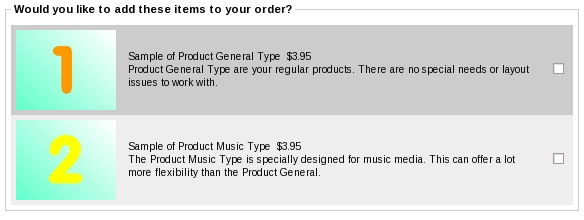
Zen Cart Impulse Buy
An upselling module for Zen Cart that places product recommendations on the checkout shipping page with easy checkbox selection. The flow of checkout is uninterrupted; the customer simply checks a box, selects a shipping method and presses the "continue checkout" button, and the items are automatically added to their cart.Impulse Buy is not a discounting module; it simply displays items for purchase.
Relevance: Zen Cart™ 1.3.8, 1.3.9, 1.5.x. See Restrictions and Interoperability for restrictions.
Current Version: 1.2a. Occasionally, new features are documented prior to being publicly available; please check the version history to ensure the feature you want is available in your version.
Support Thread: My commercial software is not supported on the Zen Cart forum. Please email me questions instead.
Cost: $30 (Note: this low price covers software only for self-installation.)

Would you like to ask me questions before buying? I'm happy to help likely purchasers make the right decision. Please use my contact form.
Installed Cost: $200.00 (Professional installation by That Software Guy)
Installation Difficulty: Moderate (You must write some PHP to configure this mod; there is no Admin panel)
Installation Instructions: click here
Common Installation Issues: click here
Buy: Get Impulse Buy Now!
Pre-purchase questions? No problem! Just Please contact me with your question.
FAQ: click here
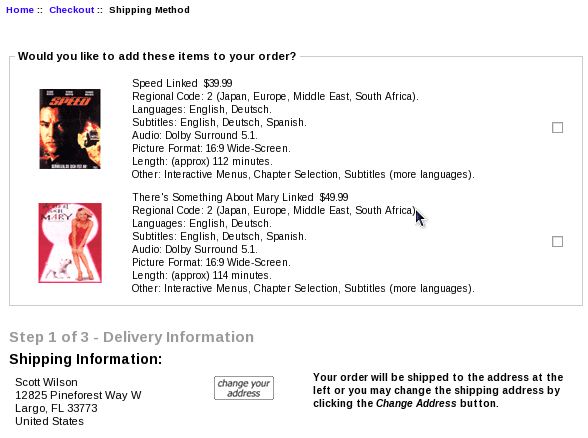
See it Live: Go to this test cart. If you go to the checkout page, you will see an impulse buy offer for "Speed Linked" and "Something About Mary." If you have a hardware item in your cart, you will also seen an impulse buy offer for "Disciples." Also, the order of these items will change on each page load. The configuration that created this is shown below in sample configurations.
Here's what the checkout shipping screen looks like with Impulse Buy:
Impulse Buy requires you to add these conditions and parameters to the module itself - they are not configured through the admin panel. This sounds complicated, but it's not that bad, and many examples of common practices are provided.
The calling conventions for building an impulse buy are simple: in the setup() function of
includes/modules/impulse.php
add the call $this->add_impulse_item();The item will then be shown on the checkout page under the following conditions:
- The item is not disabled (out of stock or otherwise).
- The item may be added to the cart (i.e. if you search for the item, the search results page shows the item with "Add to Cart" functionality and not a "More Info..." link).
- The item does not have non-defaultable attributes
- The item is not already in the cart.
(Note: Products with defaultable attributes may be used, if you have installed my Default Attribute mod.)
Sometimes you want upsell suggestions to be made conditionally, based on the contents of the cart. If you want item 27 to be shown if item 40 is already in the cart, you would do
   $this->add_impulse_item(27);
      $this->set_constraint(PROD, 40);
If you want item 27 to be shown if item 40 is not already in the cart, you would do
   $this->add_impulse_item(27);
      $this->set_negative_constraint(PROD, 40);
If you want item 27 to be shown if item 50, 51 or 51 is already in the cart, you would do
   $this->add_impulse_item(27);
      $this->set_choice_constraint(PROD, 50, PROD, 51, PROD, 52);
If you want item 27 to be shown if one of item 50, 51 or 51, and one item from category 12 is already in the cart, you would do
   $this->add_impulse_item(27);
      $this->set_choice_constraint(PROD, 50, PROD, 51, PROD, 52);
      $this->set_constraint(CAT, 12);
The following types of parameter statements are currently supported:
- set_constraint - specifies the items that must be in the cart to display the impulse item
- set_choice_constraint - specifies a set of items, some of which must be in the cart to display the impulse item
- set_negative_constraint - specifies the items which must not be in the cart to display the impulse item
- set_randomize - randomizes the order of offered items
- set_max - sets the maximum number of offered items
An add_impulse_item() must be done before any of these parameters, and the parameter applies to the add_impulse_item which directly precedes it.
Detailed Description:
Conditions and parameters are specified in the setup() function ofincludes/modules/impulse.php
There is no admin interface; you must modify the file directly.
Any number of these impulse buys may be offered; they will be displayed in the order you enter them in the function. You may optionally:
- Use the set_max() call, and only display a subset of the specified discounts.
- Use the randomize() call, randomly sort the impulse buy items you are offering.
Note that CAT has the Big Chooser/Big Spender/Combination Discounts semantics, not the Better Together ones. In Better Together, CAT only includes items directly below the specified category (i.e. CAT means "parent category" based on the master_categories_id field in the products table). In Impulse Buy, CAT includes all items below the specified category, whether they are directly below or in subcategories.
Men's Clothing (category 3)
     |
     ---->  Shirts (category 5)
     |      |
     |      -------> shirt A
     |               shirt B
     |               shirt C
     ---->  Pants (category 6)
     |      |
     |      -------> pants A
     |               pants B
     |               pants C
     ---->  Shoes (category 7)
            |
            --->  Dress Shoes (category 12)
            |     |
            |     -------> dress shoes A
            |              dress shoes B
            |              dress shoes C
            --->  Casual Shoes (category 18)
                  |
                  -------> casual shoes A
                           casual shoes B
                           casual shoes C
Specifying "Men's Clothing" as a category in Impulse Buy will
include all items in Shirts, Pants and Shoes.
Specifying "Shoes" (CAT 7) as a category will include both dress shoes and casual shoes. This cannot be done in Better Together.
Note that "parent category id" is determined using the master_categories_id field from the products table. So if casual shoes A is also linked into a category called "Hot Products," the parent category is still category 18 (Casual Shoes). For more details on category handling in Impulse Buy, please see the Category Issues page.
Formal Syntax of Configuration
The following commands, which are specified in the setup() function ofincludes/modules/impulse.php,
are the mechanism for configuring a store's impulse buy items.
Impulse buys always begin by specifying an add_impulse_item or add_impulse_item_from_cat. All subsequent parameters (until the next add_impulse_item or add_impulse_item from cat) apply to this item.
add_impulse_item
Adds a specific product id to the impulse item list.
$this->add_impulse_item(<item_number>);
where:
| item number | is the Zen Cart product id of the item to be added. |
add_impulse_item_from_cat
Adds a randomly selected product from a specific category to the impulse item list. The category specified is matched against the master_categories_id from the PRODUCTS table.
$this->add_impulse_item_from_cat(<category_number>);
where:
| category_number | is the Zen Cart master_categories_id of the item to be added. An item with this master_categories_id value is randomly selected. |
Parameters - set_constraint
The set_constraint() command specifies the items which must be present in the cart for the impulse buy item to be displayed.
$this->set_constraint(<required_purchase 1>[,<required_purchase 2>,...,<required_purchase n>]);
where:
| required_purchase | is the string PROD, CAT, or MANUF, followed by an identifier (product or category id, or manufacturer id)
<PROD | CAT | MANUF> <product, category or manufacturer identifier>
|
Parameters - set_choice_constraint
The set_choice_constraint() command specifies the items which must be present in the cart for the impulse buy item to be displayed.
$this->set_choice_constraint(<required_purchase 1>,<required_purchase 2>[,...,<required_purchase n>]);
where:
| quantity | is the number of items from this choice the customer must buy; it must be numeric |
| required_purchase | is the string PROD, CAT, or MANUF, followed by an identifier (product, category or manufacturer id)
<PROD | CAT | MANUF> <product, category or manufacturer identifier>
|
Note quantities are not specified per choice; the quantity is cumulative for all choices in the constraint.
Parameters - set_negative_constraint
The set_negative_constraint() command specifies the items which must not be in the cart for the impulse buy item to be displayed.
$this->set_negative_constraint(<ignored_purchase 1>[,<ignored_purchase 2>,...,<ignored_purchase n>]);
where:
| ignored_purchase | is the string PROD, CAT, or MANUF, followed by an identifier (product, category or manufacturer id)
<PROD | CAT | MANUF> <product, category or manufacturer identifier>
|
Parameters - randomize
The randomize() command instructs Impulse Buy to randomize the order of display of the impulse purchases; otherwise, they will be presented in the order specified in the setup() function inincludes/modules/impulse.php
$this->randomize();
Parameters - set_max
The set_max() command instructs Impulse Buy to only display a specific maximum number of items. Otherwise, all items specified in the setup function are displayed.
$this->set_max(<n>);
So if you want to specify 10 items as impulse buys buy only display two selected at random, use set_max.
Sample Configurations
The example shown on my test site uses the following configuration in the fileincludes/modules/impulse.php
This configuration displays items 17 and 19 all the time, and item 24 if an item from category 1 is present in the cart. Items are displayed in random order.
  function setup() {
     $this->add_impulse_item(17);
     $this->add_impulse_item(19);
     $this->add_impulse_item(24);
        $this->set_constraint(CAT, 1);
     $this->randomize();
  }
What if you want to randomly offer products whose parent category is category 3, and show item 12 only if item 24 is not in the cart?
  function setup() {
     $this->add_impulse_item_from_cat(3);

     $this->add_impulse_item(12);
        $this->set_negative_constraint(PROD, 24);
  }
What if you want to show item 12 only if item 24 is in the cart?
  function setup() {
     $this->add_impulse_item(12);
        $this->set_constraint(PROD, 24);
  }
What if you have several dozen possible impulse buy items and you only want to display 3?
  function setup() {
     $this->add_impulse_item(1);
     $this->add_impulse_item(3);
     $this->add_impulse_item(5);
     $this->add_impulse_item(7);
     $this->add_impulse_item(11);
     $this->add_impulse_item(13);
     ... other calls to add_impulse_item here ...
     $this->randomize();
     $this->set_max(3);
  }
Be sure to do a randomize() if you're doing a set_max on add_impulse_item() calls.
Installation Instructions:
- Back up everything! Try this in a test environment prior to installing it on a live shop.
- Copy the contents of the common_files folder to the root directory of your
shop.
Then copy the contents of the appropriate cart-specific version to the root directory of your shop. Choose the one that's closest to but not above yours. 1.5.0 and 1.5.1 should use the 1.5.0 folder, 1.5.2 and 1.5.3 should use the 1.5.2 folder.
The names of these files reflect a template name of "custom." If you are using a different template name, please change file paths using "custom" to use your template name instead. Note: If you are using Zen Cart 1.5.5 or higher, your template name will be "responsive_classic" if you have not changed it. - Decide on the impulse buy products you wish to offer.
Add them to the
setup() method of
includes/modules/impulse.php - Note that the 1.5.5 files will allow you to offer products with defaultable attributes if you have my Default Attribute mod installed.
Optional Installation Instructions:
- This note is only applicable if you have right hand sideboxes.
I think the checkout shipping page looks better and the impulse item is more visible if you turn off right hand sideboxes. To do this, modifyincludes/templates/YOUR_TEMPLATE/common/tpl_main_page.phpand addcheckout_shippingto the list of pages for which$flag_disable_rightis set.
Installation Problems:
The most common installation problems for this module are as follows:- Unfamiliarity with installing mods. Please review my Guide to Mod Installation on Zen Cart.
- Items specified as impulse buy items must be able to be added to the cart from a listing page. This means they are in stock and do not have (non-defaultable) attributes. If you have specified an item and it's not showing up in your impulse buy list, try searching for it and seeing if you can add it to the cart from the search results page.
- If you are running PHP 5.2.10 or greater and using one of the randomizing functions (add_impulse_item_from_cat or setting randomize in the setup function), you will notice they are no longer random (due to an internal change in PHP). This is fixed in Impulse Buy 1.0.3a.
- Got a blank page? Review the guidelines for Debugging a blank page in Zen Cart
Major Versions
- Version 1.2a - 05/26/2020 - PHP 7
- Version 1.2 - 12/22/2018 - PHP 7
- Version 1.1 - 08/01/2016 - Updates for Defaultable Attribute
- Version 1.0.5 - 01/03/15 - Updates for Zen Cart 1.5.4
- Version 1.0.4 - 07/12/14 - Updates for Zen Cart 1.5.2, 1.5.3
- Version 1.0.3a - 06/18/13 - Updates for PHP 5.2 (array_rand behavior).
- Version 1.0.2 - 12/26/11 - Prevent disabled items from appearing as impulse buys.
- Version 1.0.1 - 05/11/10 - Ordered set_choice_constraint by price, instead of by specified order.
- Version 1.0.0 - 10/17/09 - First release.
Restrictions and Interoperability
This mod is based on the standard Zen Cart checkout flow. It is not compatible with other checkout mods such as COWOA, One Page Checkout, Ajax Easy Checkout, etc.FAQ
Q: Why do you have to add PHP code to setup()? Why didn't you put this in the Admin panel?A: Although it's a bit tedious to have to manually code the associations, it maximizes the module's flexibility. If you need help with the setup logic, I will be happy to do it for you for a small fee, but first look at the many examples in this page.
Q: What do you mean by "defaultable attributes" or "single valued defaultable attributes?"
A: The two terms mean the same thing. They're just attributes for which a default value can be selected without needing input from the product info page. "Single valued" means the attribute has just one value. For example, a radio button with just one value (such as "PDF" or "ZIP file") is single valued. A radio button with two values (such as "red" or "green") would not be single valued. Similarly, "defaultable" means the single value can be easily set without needing additional input. For example, product with a single TEXT attribute would be single valued but not defaultable, since it's not known what the correct value would be. Similarly, a product requiring a file upload would not be defaultable.
Note that in order to take advantage of defaultable attributes, you need my Default Attribute contribution if your Zen Cart version is lower than 1.5.7. (It has been built in since Zen Cart 1.5.7.)
Q: How do I turn Impulse Buy off?
A: Remove all the code from the body of the setup() function. It should look like this:
  function setup() {
  }
Q: When I use PROD, it works, but I can't seem to get CAT to work. Why?
A: The CAT value you specify is matched against the master_categories_id field in the products table. Sometimes this value is not what you expect it to be, either because of a database upgrade or because you're using linked categories. Please see the Category Issues page for solutions.
Q: I really want the image to be a link to the product like it is on the listing page. Why isn't it?
A: I think it looks better without the link, but it's your choice. If you want to add it, I've made it an easy change:
Edit the file
includes/templates/YOUR TEMPLATE/templates/tpl_modules_impulse.php
Look for the lines
        // echo '<a href="' .  zen_href_link(FILENAME_PRODUCT_INFO, 'products_id=' . $impulse_list[$i]['id']).'">';
        echo zen_get_products_image($impulse_list[$i]['id']);
        // echo '</a>';
Uncomment out the two lines above and below the call to zen_get_products_image, so what you have is
        echo '<a href="' .  zen_href_link(FILENAME_PRODUCT_INFO, 'products_id=' . $impulse_list[$i]['id']).'">';
        echo zen_get_products_image($impulse_list[$i]['id']);
        echo '</a>';
Now the image is a link.
Q: What's the difference between Impulse Buy and Checkout Candy?
A: Checkout Candy determines which Better Together offers you have half of, and displays the missing items on your Shopping Cart and Shipping page. So if your cart has an add_prod_to_prod discount with "buy product 1 get product 2 at 50% off", and a customer's cart has product 1, Checkout Candy displays a message saying, "you qualify to get product 2 at 50% off." The products are displayed as regular listings (they way listings are shown in New Products or Featured Products) with a bit of upselling text. It does not allow you to purchase the item in a single click, since it is not limited to only products without attributes.
You could run both mods at the same time; all that would be required is to merge tpl_checkout_shipping_default.php.
Q: All these rules and parameters and combinations make my head hurt. Will you configure this for me?
A: Naturally. Contact me with your requirements for a quote.

I charge a fee of $30 for Impulse Buy.
Buy Now!
The fee covers software only; installation is extra if you require help.
The fee covers software only; installation is extra if you require help.