 eCommerce with Zen Cart!
Making your Zen Cart Shipping Policy more visible
Relevance: Any version of Zen Cart™Donate: This is free software. Show your appreciation by supporting my efforts.

First, the basics. Is your shipping policy written down? For instance, are the preconditions for free shipping clearly stated on your site? If not, let's fix this right now.
If you haven't done so yet, create your template. I'll assume it's called "custom".
Note: If you are using Zen Cart 1.5.5 or higher, your template name will be "responsive_classic" if you have not changed it.
Copy the file
includes/languages/english/html_includes/define_shippinginfo.php
to
includes/languages/english/html_includes/custom/define_shippinginfo.php
Go into your admin page, and select Tools > Define Pages Editor. Select define_shippinginfo.php. Now if you've enabled the Information sidebox, you will see what you've typed in under the link "Shipping and Returns." (To enable this sidebox, go into Tools > Layout Boxes Controller and turn sideboxes/information.php on.)
So now that we've captured this information, how can we make it available in a non-intrusive way on the first checkout page when a shipping method is being selected? Copy the file
includes/templates/template_default/templates/tpl_checkout_shipping_default.php
to
includes/templates/custom/templates/tpl_checkout_shipping_default.php
Look for the header TABLE_HEADING_SHIPPING_METHOD. After this tag is
closed, add a link to the shipping page you just created.
Now the trivial way to do this would just be to add a link to
the shipping page as a complete shopping cart page, i.e.
<?php echo '<a href="' . zen_href_link(FILENAME_SHIPPING) . '">' . BOX_INFORMATION_SHIPPING . '</a>'; ?><br /><br />and there's nothing wrong with this approach, but my preference would be to open just the shipping text in a separate, small popup window. You can do this as follows:
<?php
$shipping_policy_page = zen_get_file_directory(DIR_WS_LANGUAGES . $_SESSION['language'] . '/html_includes/', FILENAME_DEFINE_SHIPPINGINFO, 'false');
$policy = @file($shipping_policy_page);
?>
<script language="javascript">
function showship() {
 my_window = window.open ("", "mywindow1","toolbar=no,location=no,directories=no,status=no,menubar=no,scrollbars=yes,resizable=yes,copyhistory=no,width=350,height=400");
 <?php
   echo 'my_window.document.write("<html><head><title>'. BOX_INFORMATION_SHIPPING . '</title></head><body>");';
   foreach ($policy as $line) {
      $line = trim($line);
      echo 'my_window.document.write("' . $line . '");' . "\n";
   }
   echo 'my_window.document.write("</body></html>");';
   echo 'my_window.document.close();';
   echo 'return;';
 ?>
}
</script>
<?php
echo '<a href="javascript:showship()">' . BOX_INFORMATION_SHIPPING . '</a>';
?>
<br /><br />
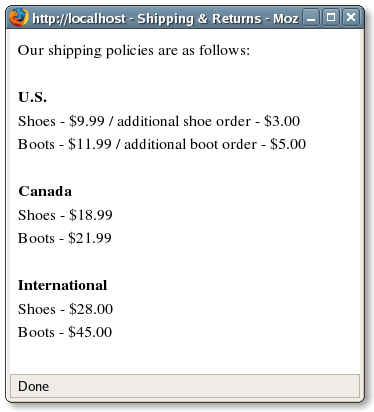
This gives you a great looking little window containing your shipping
policy.
This tip was developed in June 2007, and distributed in my newsletter in Issue #1.