 eCommerce with Zen Cart!
Zen Cart Order Copy
Order Copy allows your clients to set up a re-order from the three order viewing pages. Products from the copied order are added to their shopping cart, with the attribute settings used in the order. The customer is then redirected to the shopping cart page so that they may adjust any details.Another use case is for customers who have created quotes from your cart, and wish to change those quotes into orders.
Copy buttons appear on the following pages:
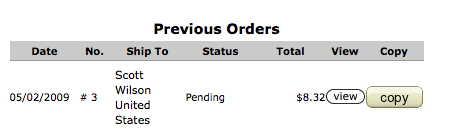
- My Account Page (Previous Orders) - Order Copy
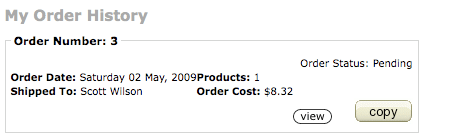
- Account History Page (My Order History) - Order Copy
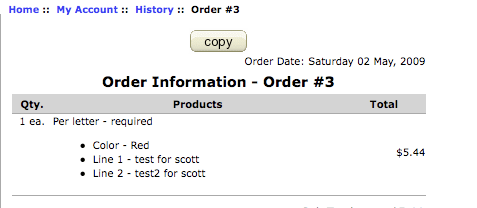
- Account History Information Page (Order Information) - Order Copy
Relevance: Zen Cart™ 1.3.8, 1.3.9, 1.5.x
Current Version: 2.3 (version history)
Support Thread: My commercial software is not supported on the Zen Cart forum. Please email me questions instead.
Cost: $45.00 (Note: this low price covers software only for self-installation.)

Would you like to ask me questions before buying? I'm happy to help likely purchasers make the right decision. Please use my contact form.
Installed Cost: $300.00 (Professional installation by That Software Guy)
Installation Difficulty: Moderate Some merging may be required.
Installation Instructions: See instructions in README file in the mod.
Related: You may also be interested in Favorites or All Purchases.
You can use Order Copy to turn customer quotes (created by the Quote Payment Method) into actual orders.
Buy: Buy Order Copy!
Pre-purchase questions? No problem! Just Please contact me with your question.
Video: You may watch Order Copy in action in this video:
Restrictions: click here for restrictions. Please read this section carefully; if you have questions, please contact me before purchasing.
My Account Page (Previous Orders) - Order Copy
Account History Page (My Order History) - Order Copy
Account History Information Page (Order Information) - Order Copy
Shopping Cart Page After Order Copy
As you can see the item in the copied order, along with all its attributes, is copied to the cart.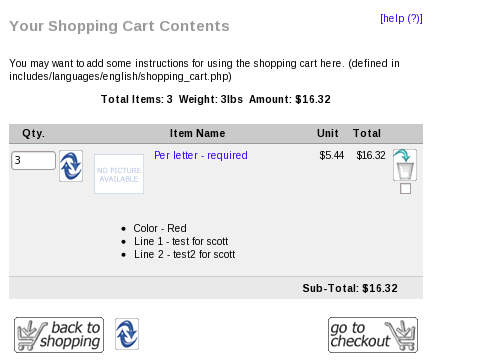
Quote to Order
If your business relies on quotes, you can create a payment method called Quote simply by cloning the money order payment module. Then, when the customer is ready to accept the quote, they can use Order Copy to copy the quote's contents to their cart, and checkout and pay with your available payment methods.If you'd like to work with me, I can further enhance your cart to more completely handle "quote" type orders, such as removing them from sales reporting, ensuring your emails say "Quote" instead of "Order", and so forth.
Major Versions
- 2.3 12/31/2021 - Updated for 1.5.7
- 2.2 01/14/2019 - Updated for 1.5.5a-f, 1.5.6
- 2.1 08/03/2016 - Updated for 1.5.5 (no functional changes)
- 2.0.0 10/18/2013 - Fixed issue with text attributes.
- 1.0.0 09/19/2012 - Updated for 1.5.1 (no functional changes)
- 1.0.0 11/06/2011 - Updated for 1.5.0 (no functional changes)
- 1.0.0 04/29/2010 - Updated for 1.3.9 (no functional changes)
- 1.0.0 05/02/2009 - First release for Zen Cart 1.3.8
Restrictions and Interoperability
- When an item in a copied order has a file attributes, the name that was entered is preserved, but the actual file is not, and there is no reference back to the original order; you will need to ask the customer for the file again.

I charge a fee of $45.00 for the
Order Copy extension.
Buy Now!.
The fee covers software only; installation is extra if you require help.
The fee covers software only; installation is extra if you require help.