 eCommerce with Zen Cart!
Zen Cart Checkout Candy for Better Together
A Zen Cart™ mod which allows you to present cross-selling or upselling offers on the shopping cart page and on the first page of the checkout process. Suggestive selling is a proven technique for increasing profits.Note: This is Checkout Candy for Better Together. There is a separate page for Checkout Candy for Combination Discounts.
Relevance: Zen Cart™ 1.3.9, 1.5.x, along with Better Together.
This extension is part of the Better Together World.
Current Version: 1.9. (version history)
Cost: $30 for just the Better Together upsell text. Buy Now!
$60 for Checkout Candy plus the Buy Now button.

(Note: this low price covers software only for self-installation.)
Would you like to ask me questions before buying? I'm happy to help likely purchasers make the right decision. Please use my contact form.
Installed Cost: $100+cost of software (Professional installation by That Software Guy)
Installation Difficulty: Moderate (Some file merging)
Installation Instructions: click here
Buy: Get Checkout Candy!
Get Checkout Candy plus Buy Now!
Pre-purchase questions? No problem! Just Please contact me with your question.
FAQ: click here
See it Live: Go to product 12 in demo shop 1 and add this product to your cart. You will notice that on the shopping cart page (and the first checkout page) that Checkout Candy re-enforces the upselling message that buying product 14 and 12 together will be discounted (because of Better Together).
To see Checkout Candy with the Buy Now button live, go to product 12 in demo shop 3 and add this product to your cart. You will notice that on the shopping cart page (and the first checkout page) that Checkout Candy re-enforces the upselling message that buying product 14 and 12 together will be discounted (because of Better Together). The Buy Now button is shown right next to the product, which makes the upsell even more attractive.
osCommerce User? This is a Zen Cart page. Look at the Better Together for osCommerce World for osCommerce help.
Overview
Why do grocers put candy at the checkout stations? Because people buy it!Checkout Candy allows a Zen Cart vendor an upselling opportunity at the two key decision points in the checkout process: when reviewing the cart and on the first page of checkout. The default upselling option for this module is Better Together.
Checkout Candy with Better Together
Like Better Together? Wish you could re-enforce the upsell message off the product info page? Checkout Candy has a Better Together fitting that shows only the unused discounts.This is different from the Better Together marketing information shown in the product information page because it shows the actual available discounts based on the current contents of the cart, not based on the hypothetical purchase of one particular item. For instance, if the mouse and keyboard are linked in Better Together, then displaying the mouse product info page will show the discount available when a keyboard is purchased. If the mouse is purchased, the shopping cart will show the keyboard discount - however, if the mouse and the keyboard are purchased, no discount will be shown on the shopping cart page, since the discount has already been taken.
The latest version of Checkout Candy adds the image of the upsell product to your Shopping Cart and Checkout Shipping Page.
Shopping Cart Page with Images
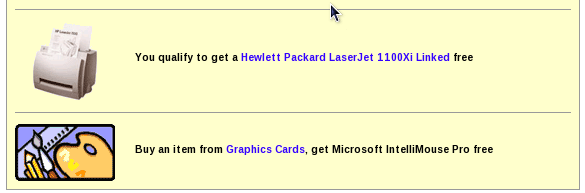
Note: You must be running Better Together 2.1 or higher to use this feature.
Additional screenshots on this page are shown without images.
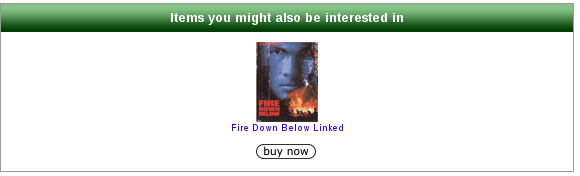
In addition to the Checkout Candy upsell message, you may add a Buy Now button if the upsell item is a product with no non-defaultable attributes. (Note: Products with defaultable attributes may be used, if you have installed my Default Attribute mod.)
Shopping Cart Page with Buy Now button
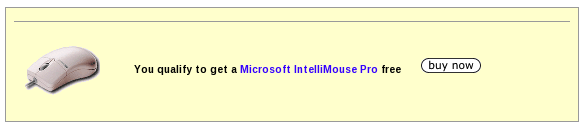 The normal Checkout Candy just shows a link to the other product in the
linkage. Checkout Candy with the Buy Now button provides a button to
buy the product with a single click. Note that it must be a product -
the linkage must be prod to prod - and the product must not have
non-defaultable attributes.
The normal Checkout Candy just shows a link to the other product in the
linkage. Checkout Candy with the Buy Now button provides a button to
buy the product with a single click. Note that it must be a product -
the linkage must be prod to prod - and the product must not have
non-defaultable attributes.
Without the Buy Now button, Checkout Candy is $30. With the button, it's $60.
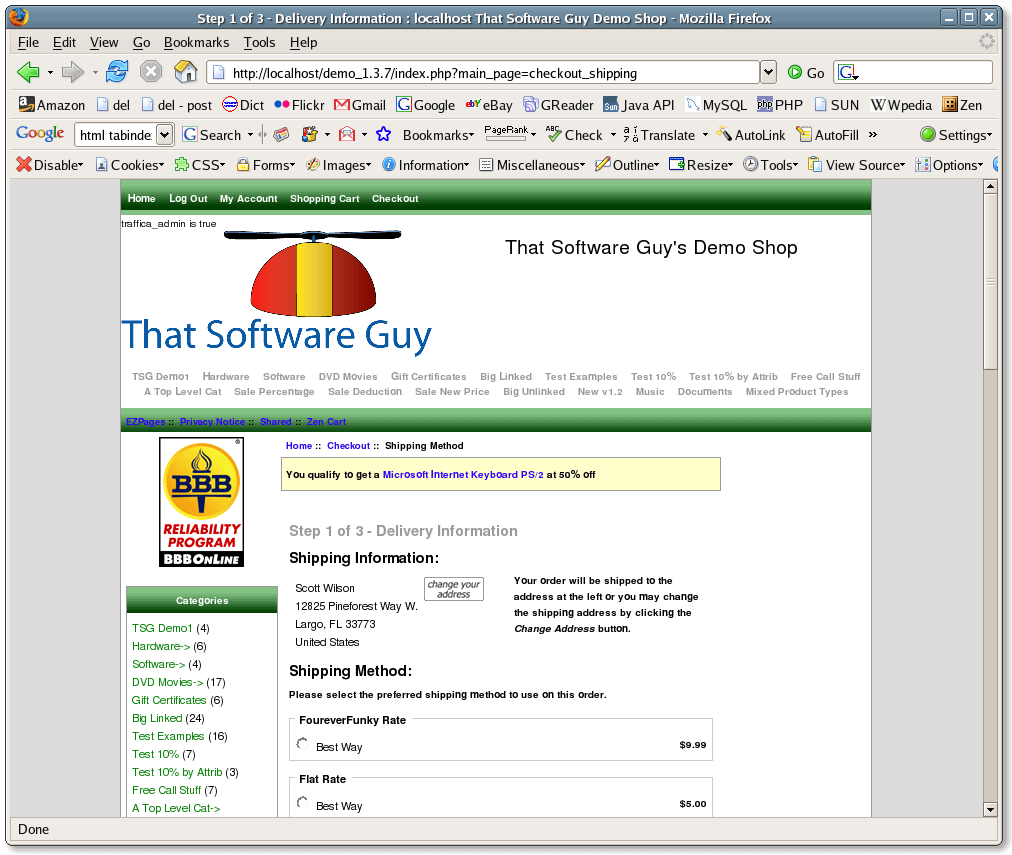
Shopping Cart Page Using Better Together
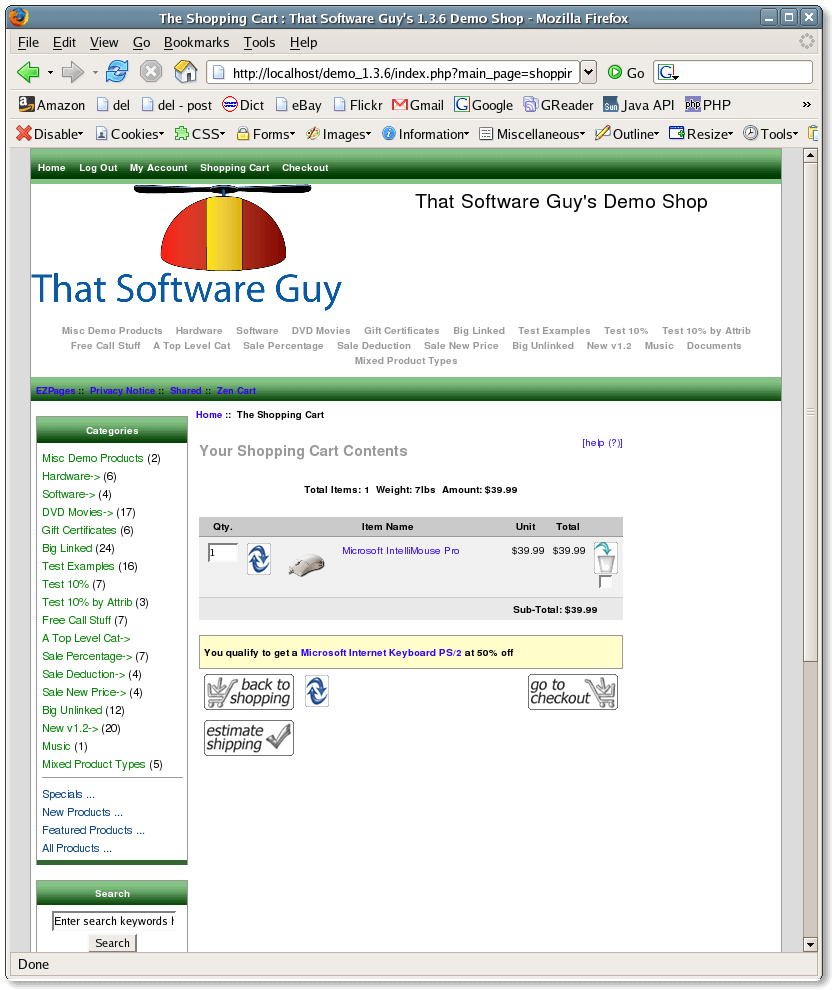
Checkout Shipping Page with Better Together
Cross Sells
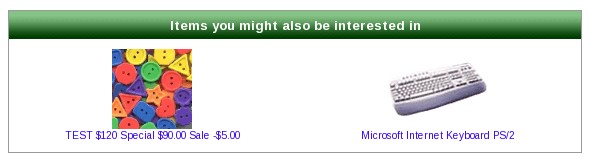
Checkout Candy also displays cross sells based on the contents of the cart and your Better Together cross sell settings.For instance, if you had the following settings in your Better Together setup() function (or had added them using Better Together Admin),
$this->add_prod_to_prod(3, 83, 'X', 0);
$this->add_prod_to_prod(3, 25, 'X', 0);
you would see a centerbox like this on your shopping cart and checkout shipping pages:
A couple of tweaks are possible by editing
includes/templates/YOUR TEMPLATE/templates/tpl_better_together_xsells_cc.php:
- The php variable $max_xsells_per_row can be increased from the default of 3 to set a large number of items shown on each row.
- The variable $max_xsells can be set to a non-zero value to limit the total number of cross sell items shown in the centerbox. By default, all are shown.
Installation Instructions:
- Back up everything! Try this in a test environment prior to installing it on a live shop.
- If you have not already done so, install Better Together. Checkout Candy uses the configuration from Better Together.
- Copy the contents of the unzipped folder to the root directory of your
shop.
Then copy the contents of the appropriate cart-specific version to the root directory of your shop.
Choose the one that's closest to but not above your version.
The names of these files reflect a template name of "custom." If you are using a different template name, please change file paths using "custom" to use your template name instead. Note: If you are using Zen Cart 1.5.5 or higher, your template name will be "responsive_classic" if you have not changed it. - If you have also ordered
Discount Preview from me, you will have to merge the files
./includes/templates/custom/templates/tpl_shopping_cart_default.phpand./includes/templates/custom/css/shopping_cart.css
Possible Tweaks:
These are all changes you can make to the fileincludes/functions/extra_functions/checkout_candy.php
-
Possible discounts are shown in the order in which they're specified in
includes/modules/order_total/ot_better_together.php(or the order in which they are added to the database if you're using Better Together Admin). If you want to randomize these, right above the line that says$msglist = array();
add the lineshuffle($discountable_products);
- If you have a lot of discounts for the same product and want to
randomize these, then
right after the line that says
$resp = $bt->get_discount_info($prod, $current_category_id, true);
add the lineshuffle($resp);
Make the same change right after the line that says$resp = $bt->get_reverse_discount_info($prod, $current_category_id, true);
-
If you have a lot of discounts for the same product, and don't want to
show them all, the change is similar. We'll assume you want to show
2 possible discounts per product.
Right after the line that says
$resp = $bt->get_discount_info($prod, $current_category_id, true);
add the lineshuffle($resp); if (sizeof($resp) > 2) $resp = array_slice($resp, 0, 2);
Make the same change right after the line that says$resp = $bt->get_reverse_discount_info($prod, $current_category_id, true);
If you want to use a number other than 2, change both 2's to the number you'd like to use. -
If you have used the step above and still have too many entries
in your Checkout Candy list, you can reduce the list further after all
these reductions have been done.
Suppose you only want to show 3 offers.
Right above the line that says
return $marketing_data;
addif (sizeof($marketing_data) > 3) $marketing_data = array_slice($marketing_data, 0, 3);
If you want to use a number other than 3, change both 3's to the number you'd like to use.
Major Versions of Checkout Candy
- 1.9 - 12/25/2018 - Updates for Zen Cart 1.5.6.
- 1.8.1 - 05/03/2017 - Works with Better Together 2.5.3.
- 1.8 - 08/01/2016 - Updates for Zen Cart 1.5.5
- 1.7 - 07/12/2014 - Updates for Zen Cart 1.5.2, 1.5.3, fix array_rand issue from PHP 5.2+.
- 1.3.9_6 - 04/01/2012 - Removed duplicates from cross sells
- 1.3.9_5 - 11/13/2011 - Improved formatting
- 1.3.8_4 - 10/20/2011 - Updated Better Together
- 1.3.9_4 - 10/19/2011 - Updated Better Together
- 1.3.9_3 - 02/21/2011 - Updates for 1.3.9
- 1.3.8_3 - 10/26/2010 - Added cross sells
- 1.3.8_2 - 12/20/2009 - First release
- 1.3.7_2 - 12/20/2009 - Adds images
- 1.3.7.1 - 9/6/2007 - Checks to ensure BT is on before printing the text.
- 1.3.7 - 3/1/2007 - Updates for 1.3.7
- 1.3.5 - 12/29/2006 - First Release
Major Versions of Checkout Candy with the Buy Now button
- 1.9 - 12/25/2018 - Updates for Zen Cart 1.5.6.
- 1.8.1 - 05/03/2017 - Works with Better Together 2.5.3.
- 1.8 - 08/01/2016 - Updates for Zen Cart 1.5.5, Default Attribute
- 1.7 - 07/12/2014 - Updates for Zen Cart 1.5.2, 1.5.3, fix array_rand issue from PHP 5.2+.
- 1.3.9_6 - 04/01/2012 - Added buy now to cross sells, removed duplicates
- 1.3.9_5 - 11/13/2011 - Improved formatting
- 1.3.8_4 - 10/20/2011 - Updated Better Together
- 1.3.9_4 - 10/19/2011 - Updated Better Together
- 1.3.9_3 - 02/21/2011 - Updates for 1.3.9
FAQ
Q: What do you mean by "defaultable attributes" or "single valued defaultable attributes?"A: The two terms mean the same thing. They're just attributes for which a default value can be selected without needing input from the product info page. "Single valued" means the attribute has just one value. For example, a radio button with just one value (such as "PDF" or "ZIP file") is single valued. A radio button with two values (such as "red" or "green") would not be single valued. Similarly, "defaultable" means the single value can be easily set without needing additional input. For example, product with a single TEXT attribute would be single valued but not defaultable, since it's not known what the correct value would be. Similarly, a product requiring a file upload would not be defaultable.
Note that in order to take advantage of defaultable attributes, you need my Default Attribute contribution if your Zen Cart version is lower than 1.5.7. (It has been built in since Zen Cart 1.5.7.)

For just the Better Together upselling text, the
fee is $30.
Buy it.
$60 for Checkout Candy plus the Buy Now button. Buy it.
The fee covers software only; installation is extra if you require help.
$60 for Checkout Candy plus the Buy Now button. Buy it.
The fee covers software only; installation is extra if you require help.