 eCommerce with Zen Cart!

Zen Cart Gift Wrap At Checkout
Gift Wrap at Checkout is a Zen Cart™ contribution which allows a shopowner to provide and bill for gift wrapping services.Donate: This is free software. Show your appreciation by supporting my efforts.

Relevance: Zen Cart™ 1.3.7 - 1.3.9, 1.5.x. Be sure to use the appropriate version for your cart version. See interoperability for restrictions.
Current Version: 2.14 Please check the version history to select the correct version for your Zen Cart.
Support Thread: Gift Wrap Support Thread
Cost: Free, but donation appreciated
Installed Cost: $200 Buy Professional Installation by That Software Guy
Installation Difficulty: Moderate - High
Installation Instructions: See instructions in README file in the mod.
Location: Zen Cart Plugins, under Other Modules.
Download: Gift Wrap in Zen Cart Plugins
FAQ: click here
Bugs: click here
Interoperability: This mod is based on the standard Zen Cart checkout flow. It is not compatible with other checkout mods such as COWOA, One Page Checkout, Ajax Easy Checkout, etc.
Note: This module essentially obsoletes my old Gift Wrap (version 1) module. You are free to use the old one, but I think this one is much better.
Overview:
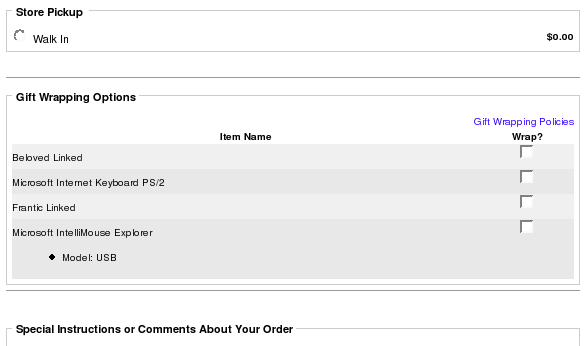
This contribution provides a very straightforward mechanism for permitting your customers to select gift wrapping at checkout time. The selection is done on a per product basis on the shipping page. A checkbox is provided for each product to indicate whether or not giftwrap is desired.The advantage of this solution over previous solutions is that individual wrapping attributes do not have to be added to each product.
Shipping Page displaying Gift Wrapping
Shipping Page displaying Gift Wrapping - duplicate and N/A items
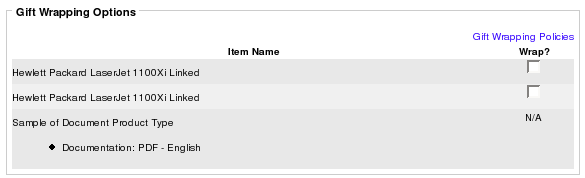
For maximum flexibility, one checkbox is provided for each product in the cart; if two identical products are chosen, two checkboxes are provided. Virtual products and downloadable products have "N/A" instead of a checkbox.
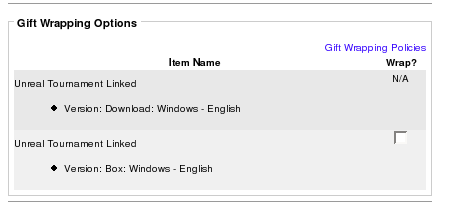
Gift Wrapping can differentiate between downloadable and non-downloadable versions of the same item.
As of version 2.7 and above, you may select from images (swatches) or text descriptions of gift wrap in the giftwrap module configuration by setting Admin > Modules > Order Total > Giftwrap > Wrap Selection Option. These options are shown for an item when the wrap checkbox is checked for that item.
Here is gift wrap showing images of wrapping styles. Notice how only the top item, which has the wrap checkbox checked, shows the wrap choices.
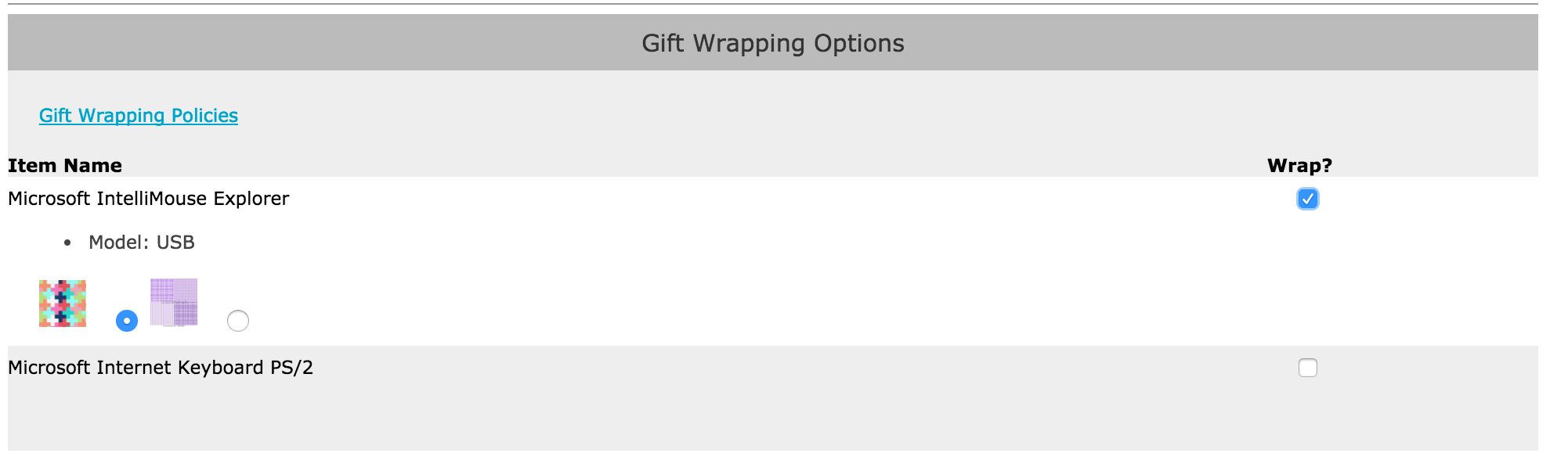
And here is gift wrap showing text descriptions of wrapping styles. Again, notice how only the bottom item, which has the wrap checkbox checked, shows the wrap choices.
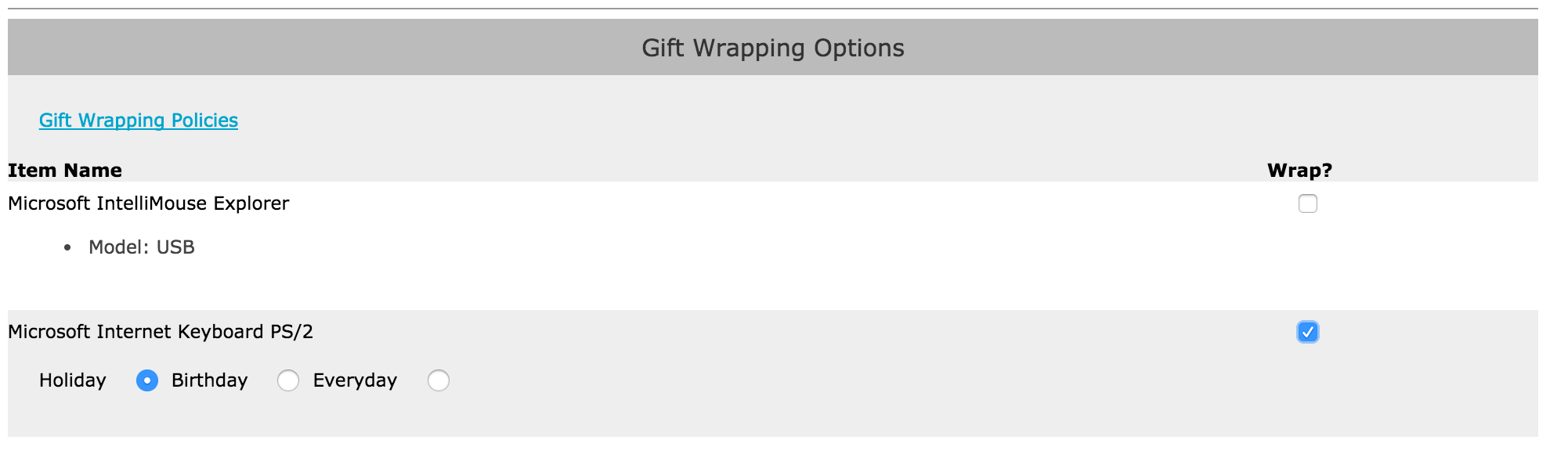
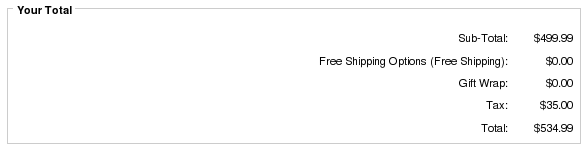
The computed total fee is shown as an order total on the payment page.
Payment Information Page displaying Gift Wrapping Fee
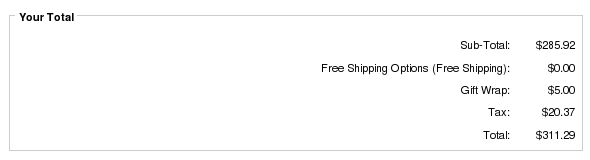
Finally, a summary of gift wrapping selection is done on the confirmation page.
Confirmation Page displaying Gift Wrapping Details
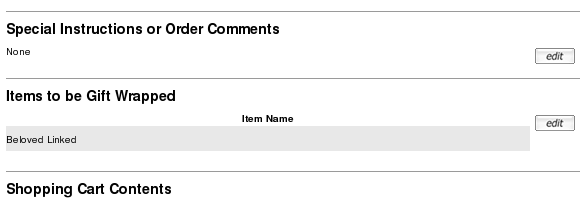
If Wrap Selection of Images or Descriptions was used, this is also shown on the confirmation page.
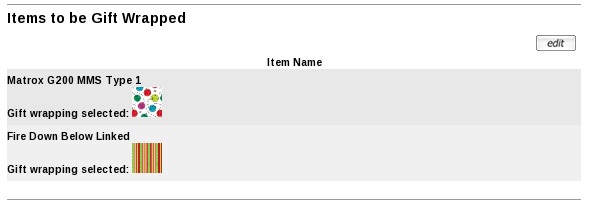
Clicking the edit button will return the customer to the shipping page where gift wrapping options may be changed.
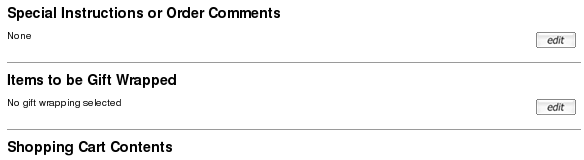
If no gift wrapping has been chosen, this will also be indicated on the confirmation page as follows:
Confirmation Page displaying no gift wrapping
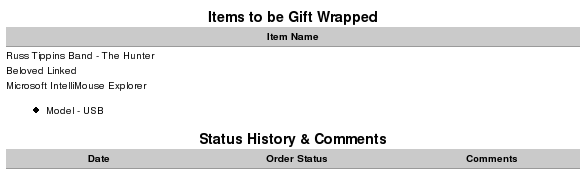
After the order is complete, the gift wrapping settings may be viewed on the Account History page. This is what the Account History page looks like for Wrap Selection Option = Checkbox.
Account History Page displaying gift wrapping (checkboxes)
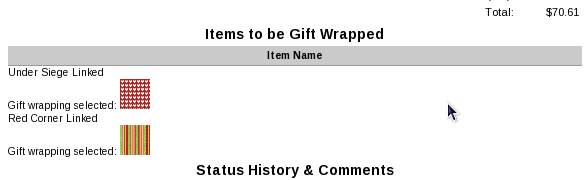
This is what the Account History page looks like for Wrap Selection Option = Images.
Account History Page displaying gift wrapping (images)
The order confirmation email will only show the number of each item selected for wrapping.
4 x Hewlett Packard LaserJet 1100Xi Linked (HPLJ1100XI) = $499.99
Wrapped: 2
Wrapped: 2
Now that the order is complete, the wrapping selections may be viewed by the Administrator in Admin > Customers > Orders > Edit and Admin > Customers > Orders > Invoice.
Pricing Model
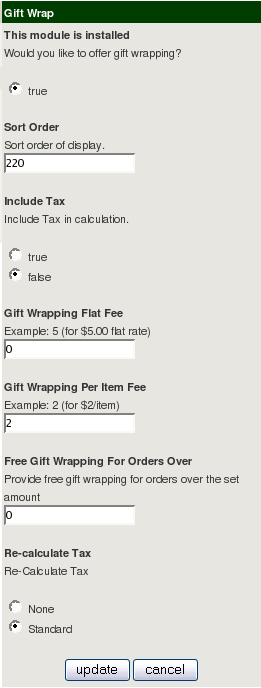
The gift wrap pricing model is very simple; in addition to the usual "free over" setting, there is a per order flat fee and a per item fee. Both or either can be used; in the example shown, the flat fee is $5, and the per item fee is $1, so a one item order, wrapped, would be billed at $6, two items at $7, and so forth. Obviously these fees are only charged if there are gift wrapped items in the order. The "free over" setting is used when its value is set to greater than 0. In the configuration shown, free gift wrapping would be provided to orders over $100.
Typical configurations:
- Two dollars per item: set flat fee to 0, per item fee to 2, free gift wrapping to 0
- Five dollars per order: set flat fee to 5, per item fee to 0, free gift wrapping to 0
- One dollar per item, free for orders over $100: set flat fee to 0, per item fee to 1, free gift wrapping to 100
includes/languages/english/extra_definitions/giftwrap.php
should be used to explain your policies. This is the text your customers
will see when they click "Gift Wrapping Policies" in the Gift Wrapping options
section of the Shipping page (see the first image on this page).
If you need charge more for wrapping certain items or not provide wrapping at all for certain items, this can be done through the user exits described below.
Note that if any gift wrapping is selected, a line item for gift wrapping appears in the total even if there is no charge (to emphasize that the service is being provided).
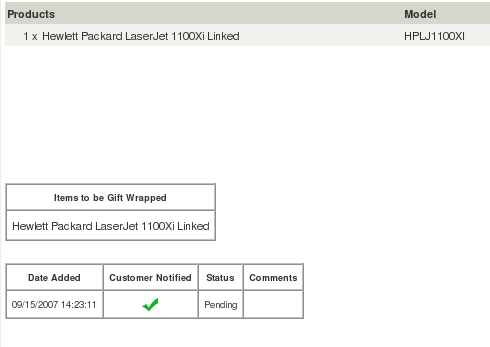
Gift Wrapping in Admin
In the Admin area, gift wrapping selections are displayed on the Admin > Orders > Invoice and Admin > Orders > Edit screens.This is what an order looks like for Wrap Selection Option = Checkbox.
This is what an order looks like for Wrap Selection Option = Images.
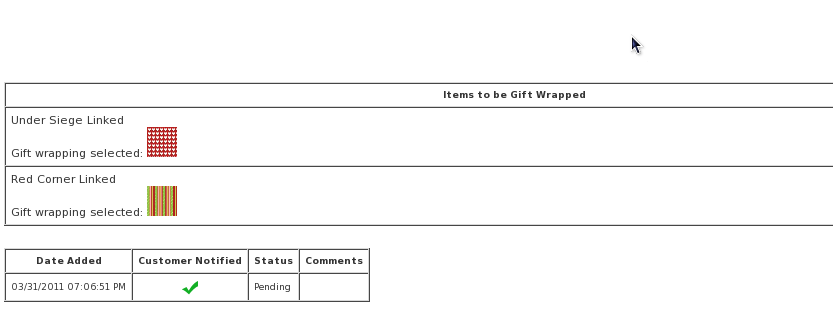
The items for which gift wrapping has been selected are shown on the Admin > Orders > ;Edit screen in a small table under the order (just above the order status box). The same method is used to display this information on the Invoice screen.
User Exits
The following exits are provided for customization:- Disable gift wrapping by product id - exclude_product()
- Disable gift wrapping by category - exclude_category()
- Surcharge gift wrapping by product id - apply_product_wrap_surcharge()
- Surcharge gift wrapping by category - apply_category_wrap_surcharge()
Each of these is a PHP function within the file
ot_giftwrap_checkout.php
Examples are given in each function of how to use it.
If you are doing this sort of change, be sure to document it in the GIFT_WRAP_EXPLAIN_DETAILS define described above.
Bugs
- If you are using FEC and Gift Wrap together, please review my list of fixes for Numinix FEC and Zen Cart Gift Wrapping.
-
Carts which use PayPal IPN were not handling
Gift Wrap properly.
This bug was reported in Gift Wrap at Checkout 2.4 and below.
To fix, please move
includes/extra_configures/giftwrap_tables.php
toincludes/extra_datafiles/giftwrap_tables.php
Major Versions
- 2.14 06/27/2019 - Updates for Zen Cart 1.5.6
- 2.13_1.5.x 12/10/2016 - Fix missing show wrap swatch/description logic in 1.5.4/1.5.5a
- 2.12_1.5.x 09/18/2016 - Update to 1.5.5a
- 2.11_1.5x 01/03/2015 - Updates for Zen Cart 1.5.4
- 2.10_1.5x 07/13/2014 - Updates for Zen Cart 1.5.2, 1.5.3
- 2.9_1.5.x 09/18/2012 - Update to 1.5.1
- 2.8_150_rc1 11/06/2011 - Update to 1.5.0 rc1
- 2.8_150 07/26/2011 - Update to Beta 1.5.0 Release.
- 2.8a_139 07/26/2011 - Merge updated
./includes/modules/pages/checkout_shipping/header_php.php - 2.8_139 08/20/2010 - Fixed pricing issue
- 2.7_139 07/01/2010 - Added wrap selections
- 2.6_138 12/03/2008 - Added wrapping info to packing slip
- 2.5_138 07/23/2008 - Fixed issue with PayPal IPN
- 2.4_138 01/09/2008 - Fixed include tax issue
- 2.3_138 01/03/2008 - Updated for 1.3.8
- 2.3 12/18/2008 - Fixed an error in the updating of the order total table.
- 2.2 12/01/2007 - Added include_tax logic for VAT countries; aligned checkbox vertically, removed test code.
- 2.1 11/10/2007 - Added features: user exits for not offering wrapping on products and categories, user exits for surcharging wrapping, ability to turn off user checkout wrapping from admin.
- 2.0 10/12/2007 - Rewritten so that gift wrapping can be selected on the shipping page.
- 1.0 12/11/2006 - First Release
FAQ
Q: How do I set up giftwrap swatches?A: First, set Admin > Modules > Order Total > ;Giftwrap > Wrap Selection Option to "Images". Then put your swatches in /images/giftwrap. Now the swatches will show up when someone clicks the giftwrap checkbox for an item in their cart.
Q: How do I set up giftwrap text descriptions?
A: First, set Admin > Modules > Order Total > Giftwrap > Wrap Selection Option to "Descriptions". Then set the
$wrap_selections variable in
includes/languages/english/extra_definitions/giftwrap.php
Now the descriptions you used will show up
when someone clicks the giftwrap checkbox for an item in their cart.
Q: I'm using a category exit (exclude_category() or apply_category_wrap_surcharge()), and it's not working!
A: Please see the Category Issues page for solutions.
Q: I'm upgrading from Gift Wrap 2.1 to a later version, but I can't see one of the new features!
A: Note your Gift Wrap settings, and then remove (Admin > Modules > Order Total > Remove) and then re-install Gift Wrap at Checkout. New database entries have been added which necessitate re-installation.
Q: Can I run Gift Wrap with another version of Zen Cart?
A: Gift Wrap modifies a lot of core files, so each version is aligned with exactly one version of Zen Cart. You should run the version that's appropriate for your version of the cart.
Q: I'm getting an error that looks like this:
Warning: Division by zero in ...includes/modules/order_total/ot_giftwrap_checkout.php on line 174
A: This is fixed in version 2.4. To fix it now, change the file
includes/modules/order_total/ot_giftwrap_checkout.php line 173 from
if ($this->include_tax == 'true') {
to
if ($wrapfee != 0 && $this->include_tax == 'true') {