
My Zen Cart 360 Sales Reporting mod has just been released. If you receive payments by direct deposit from customers who don’t check out using your cart, or payments in another way outside the context of your shopping cart, you can use this mod to track your per customer sales reporting including these figures.
Showing Zen Cart Customer Updates needed by Salesforce
If you’ve installed my Zen Cart to Salesforce Customer Import tool, and done a few exports of customers from your admin, you’d probably like an easy way to see how many updates (if any) are outstanding when you login to your Zen Admin.
I have made a small modification to the admin dashboard (in Zen Cart 1.5.5) to do this, which is described below. Steps:
a) Add the define BOX_ENTRY_UPDATES_TO_SALESFORCE to admin/includes/languages/english/index.php.
define('BOX_ENTRY_UPDATES_TO_SALESFORCE','New/Updated records for Salesforce');
b) Add the logic to calculate and display the number of new/updated records to admin/index_dashboard.php.
Calculate it below the salemaker query on line 31:
$last_export = $db->Execute("SELECT * FROM " . TABLE_SFDC_CONFIG);
$last_customers_export = $last_export->fields['last_customers_export'];
$salesforce_customers_query = "SELECT count(*) AS count FROM " .
   TABLE_CUSTOMERS . " c, " . TABLE_ADDRESS_BOOK . " a, " .
   TABLE_CUSTOMERS_INFO . " ci WHERE a.customers_id = c.customers_id
   AND a.address_book_id = c.customers_default_address_id AND
   ci.customers_info_id = c.customers_id AND
   (ci.customers_info_date_account_created > '" .
   $last_customers_export . "' OR
   ci.customers_info_date_account_last_modified > '" .
   $last_customers_export . "')";
$salesforce = $db->Execute($salesforce_customers_query);
Now display it below the customers count display on line 72:
echo '<div class="row"><span class="left">
   <a href="' . zen_href_link(FILENAME_SFDC_EXPORT_CUSTOMERS) . '">' .
   BOX_ENTRY_UPDATES_TO_SALESFORCE . '</a></span>
   <span class="rigth"> ' . $salesforce->fields['count'] . '</span></div>';
The typo in the class name right is required in Zen Cart 1.5.5; it has been fixed in Zen Cart 1.5.6.
Lifetime Customer Value for Zen Cart customers
When coach Ryan Waggoner asked me about the lifetime value of my average customer, I was embarrassed to say I didn’t know! So I added Lifetime Customer Value to the Zen Cart Admin->Customers page in this pull request. The change is now in the 1.5.6 branch, but it can be easily backported to any 1.5.x version of Zen Cart. It’s a great way to get visibility into the activity of all you customers, and especially your most valuable ones.
It’s Hacktoberfest Again!
Just three pull requests, and you’ll get a great t-shirt! Here’s last year’s:
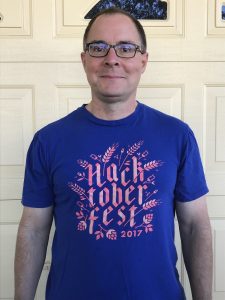
To get started, go to the Hacktoberfest site and sign up with your Github account!
Wild Dove Messaging System for Zen Cart
Got this from a client in Hawaii:
Scott,
I continue to be impressed with your use of innovative communication systems, especially those custom designed for customers dealing in bioresources!
While I was doing hours of Zen Cart meditations, your messenger flew into the office.
We were a little offended by the fresh avian “software” downloaded on the desk but I did get the message…
Aloha,
Ed

Dreamforce 2018 – talking about small business
Dreamforce is the largest software conference in the world, drawing over 170,000 participants from all over the world to San Francisco, California. The topic? Salesforce.
I was fortunate to be selected to share my experience with Salesforce Essentials (and talk about small business in general) at this year’s Dreamforce conference. This was the quote I liked the best, which was shared by the Salesforce SMB team on Twitter.

Promoting Zen Cart cross-sells created with Discount Chooser
Zen Cart Discount Chooser (also known as Free Gift Chooser) is a great way to create cross-selling promotions (Buy product A, get product B at a discount) for your shopping cart. However, because the configurability of the promotions has so many possibilities, I was never able to create a module like Better Together Checkout Candy for Zen Cart, which notices that A is in the cart and prompts the customer to buy B.
Because I recognized that customers needed some sort of promotional mechanism, I created Big Upsell for Zen Cart, which shows the available offers on the Shopping Cart and Checkout Shipping pages. Using Big Upsell, in conjunction with Discount Preview (which shows the discount once the customer has purchased all the components of the promotion), allows you to more effectively promote the discounts you have created.
My Zen Cart Isn’t Working!
I get emails like this all the time:
- Why did my Zen Cart stop working?
- My Zen Cart is broken!
- Zen Cart just stopped taking orders!
What’s the root cause? It varies – old software, failed upgrade, hoster changes … it goes on and on.
But here’s the good news: I can fix it. You might have to upgrade, but I can take care of that too. Just go on my Zen Cart Support plan and I’ll get started bringing your cart back to life.
How to style the EXTRA_INFO block in Zen Cart HTML emails
By default, if you look at the HTML emails sent by Zen Cart, the $EXTRA_INFO block is unstyled. So it doesn’t fit in with the rest of the content, which is styled.
Fixing this problem easy. Just modify the templates that use this variable (email/*.html) and change
$EXTRA_INFO
to
<div class="xextra-info">
$EXTRA_INFO
</div>
Then instead of this:

you will see this:
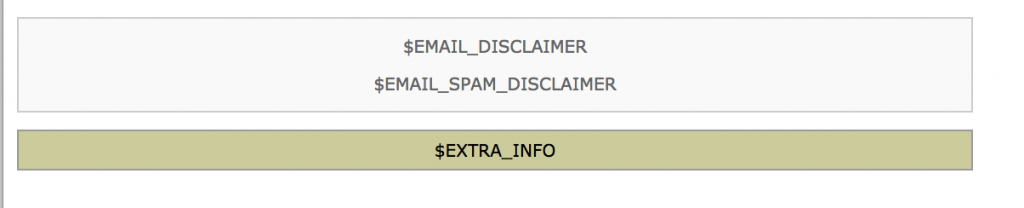
If you want to see a complete execution of this change, you can look at my Zen Cart 1.5.6 Pull Request to fix this issue.
Zen Cart Per User Group Specials
Many people don’t know that Zen Cart Per User Group Specials also allows you to create per user or group Sales! (In Zen Cart, Sales are per *category* discounts, whereas Specials are per item discounts.)
Creating a per user or group sale looks just like creating a regular sale, except there are settings that allow you to configure it on a per user or group basis.
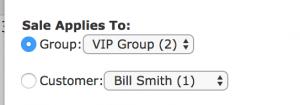
Once the sale is created, it looks like any other sale when seen by the targeted user or group.
