 eCommerce with Zen Cart!
Zen Cart Better Together Promotional Page
The Better Together Promotional Page is a single page in your cart that shows off all your Better Together discounts. It is linked from the Information sidebox.Donate: This is free software. Show your appreciation by supporting my efforts.

Relevance: Zen Cart™ 1.3.0-1.3.9, 1.5.x, along with Better Together.
This extension is part of the Better Together World.
Current Version: 2.2a, 2.3b for Add Both to Cart (version history)
Support Thread: Better Together Promotional Page Support Thread
Cost: The Better Together Promotional Page is Free, but donation appreciated.
The Add Both to Cart button is $20.00. (Note: this low price covers software only for self-installation.)

Would you like to ask me questions before buying? I'm happy to help likely purchasers make the right decision. Please use my contact form.
Installed Cost: $60 for Promotional Page, $80 with Add Both to Cart (Professional installation by That Software Guy)
Installation Difficulty: Easy
Installation Instructions: click here
Location: Zen Cart Plugins, under Marketing Tools
Download: Better Together Promotional Page from Zen Cart Plugins
Buy: Buy Add Both to Cart!
FAQ: click here
See it live: Sample Better Together Discount promotional page
(Note that the sample also uses Add Both to Cart.)
Bugs: click here
osCommerce User? This is a Zen Cart page. Look at the Better Together for osCommerce World for osCommerce help.

Want to do it Amazon style?

If desired, you can also add a button to buy both products with one click. This is a paid upgrade to the Better Together Promotional Page.
Note that for the Add Both to Cart button to work, both items in the Better Together linkage must be products, and neither may have attributes. (In other words, add_prod_to_prod and add_twoforone_prod linkages are supported.)
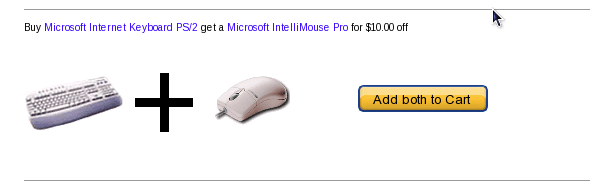
The Better Together Promotional Page with Add Both to Cart is $20.00. Buy Now! Note that for Add Both to Cart to work, both items in the Better Together linkage must be products, and neither may have attributes. The discount will still be displayed but the button will not if either item is a category or a product with attributes.
Note that Add Both to Cart works best with Discount Preview. This way, customers can see their discount on the shopping cart page instead of having to wait for the Checkout Payment page.
Installation Instructions:
- Back up everything! Try this in a test environment prior to installing it on a live shop.
- Copy the contents of the unzipped folder to the root directory of your
shop.
The names of these files reflect a template name of "custom." If you are using a different template name, please change file paths using "custom" to use your template name instead. Note: If you are using Zen Cart 1.5.5 or higher, your template name will be "responsive_classic" if you have not changed it.
Note that if you have already modified./includes/templates/custom/sideboxes/tpl_categories.php
you will need to merge the changes to this file.
Major Versions of Better Together Promotional Page
- 2.2a 12/20/2009 - Fix for second image in CAT_TO_PROD
- 2.2 10/18/2009 - Fix for category images
- 2.1 08/20/2009 - Using images as well as text.
- 2.0 09/01/2008 - Updated for Better Together 2.0
- 1.0 09/01/2007 - First Release
Major Versions of Add Both to Cart
- 2.3b 03/08/2012 - Update for Zen Cart 1.5.
- 2.3a 07/08/2011 - Fix marketing text HTML.
- 2.2a 12/20/2009 - Fix for second image in CAT_TO_PROD
- 2.2 10/18/2009 - Fix for category images
- 2.1 08/20/2009 - Using images as well as text.
- 2.0 09/01/2008 - Updated for Better Together 2.0
- 1.0 09/01/2007 - First Release
Bugs
- The first version with images (2.1) did not display category images correctly, so Better Together offers using add_prod_to_cat(), add_cat_to_cat() or add_cat_to_prod() linkages were not displayed correctly.
FAQ
Q: What's the difference between the Promotional Page with Add Both to Cart, the Better Together Centerbox and the I Want Both button, and Buy Both Now?A: They're all separate products. Buy Both Now works with the marketing text on the product info page; Add Both to Cart works on the Promotional page, and the Centerbox (and the I Want Both button) works on the main page.
Q: I'd like to edit the promotional page in the Define Pages Editor, but it doesn't work. How do I do this?
A: Copy the file
includes/languages/english/html_includes/custom/define_<page-name>.php
to the parent directory
includes/languages/english/html_includes/
Then the Define Pages editor
will let you edit the one in "custom."

I charge a fee of $20.00 for the Better Together Promotional Page with Add Both to Cart.
Buy Add Both to Cart.
The fee covers software only; installation is extra if you require help.
The fee covers software only; installation is extra if you require help.