 eCommerce with Zen Cart!

Zen Cart What's On Sale?
What's on Sale is a Centerbox mod. It looks like the Specials Centerbox, but instead of displaying Specials it displays Sales.Donate: This is free software. Show your appreciation by supporting my efforts.

Relevance: Zen Cart™ 1.3.9, 1.5.x
Current Version: 1.2b (See version history).
Support Thread: What's on Sale? Support Thread
Cost: Free, but donation appreciated
Installed Cost: $100.00 Buy Professional Installation by That Software Guy
Installation Difficulty: Easy
Installation Instructions: click here
Location: Zen Cart Plugins, under Marketing Tools.
Download: What's on Sale in Zen Cart Plugins
Overview:
What's on Sale is a Centerbox mod which acts like the Specials Centerbox, except for Sales. It has all the same configuration switches as the Specials Centerbox.Note that unlike Specials, there is no "Sales" page in the Categories sidebox; the What's on Sale mod only provides a Centerbox.
The Centerbox shows sale categories and products. The maximum numbers to display of categories and products on sale are settings in Admin > Configuration > Maximum Values. The screenshot below uses the settings "Maximum Display of Sale Categories = 3, Maximum Display of Sale Products = 6."
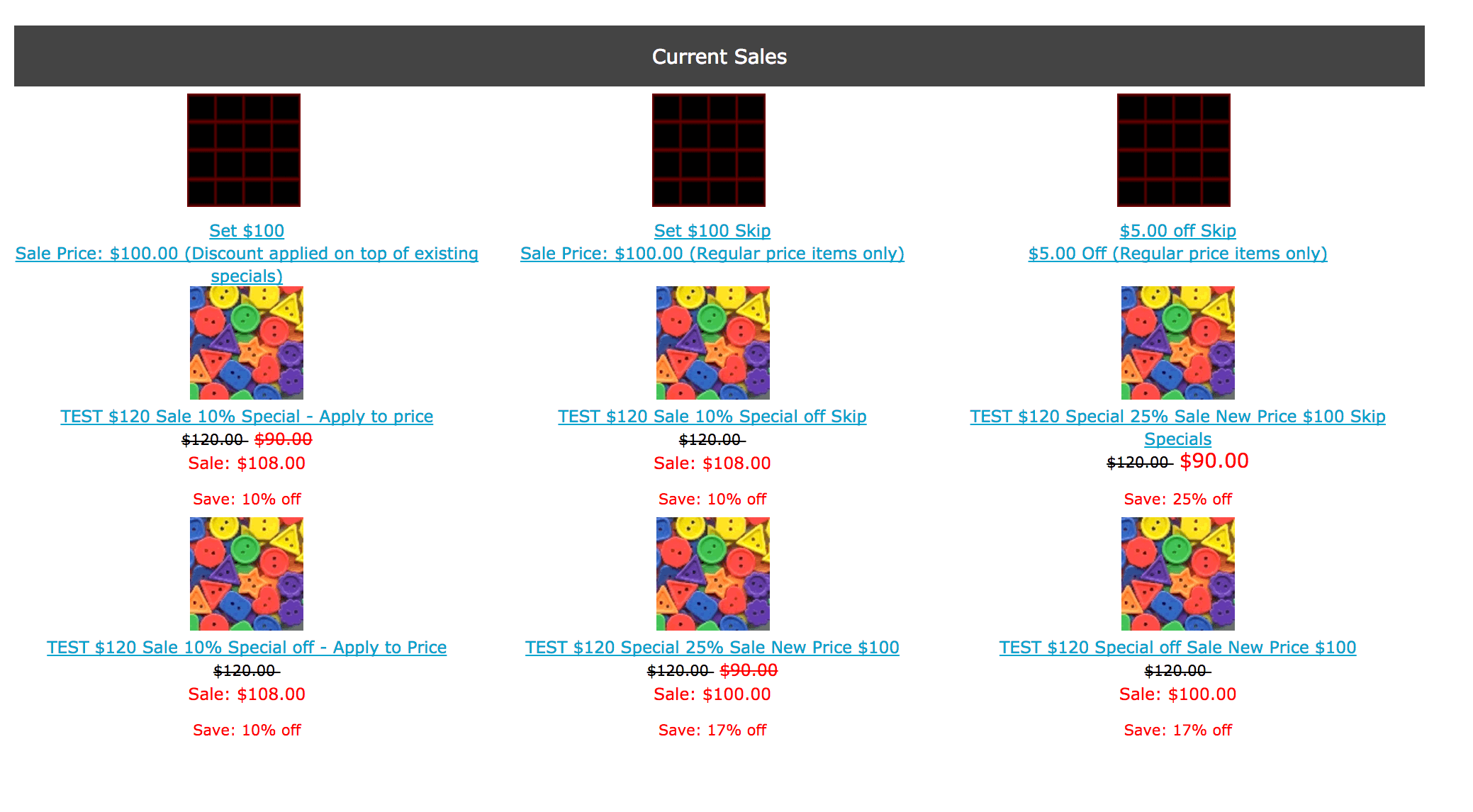
The Centerbox is shown by default only on the main page. You may also show it on the category with subcategories page, errors and missing products page, product listing page, and empty shopping cart page by installing the optional files.
Details:
Sales and Specials are two different things in Zen Cart. Specials are item by item price reductions. Sales are price reductions which are given on entire categories of items. Sales are created using the Admin menu item in Admin > Catalog > SaleMaker.Because the Sale and Special facilities are separate, items can be on sale and special at the same time. There are rules which govern price computation when an item is both on sale and on special, which are based on the setting you used when you created the sale.
You may configure the sale to do any of these three things:
- Ignore Specials Price - Apply to Product Price and Replace Special
- Ignore SaleCondition - No Sale Applied When Special Exists
- Apply SaleDeduction to Specials Price - Otherwise Apply to Price
Installation Instructions:
This mod assumes your template name is "custom." If you have used another template name, use that name when installing this mod instead of custom. Note: If you are using Zen Cart 1.5.5 or higher, your template name will be "responsive_classic" if you have not changed it.- Back up everything! Try this in a test environment prior to installing it on a live shop.
- Unzip the file you have received.
- Copy the contents of the unzipped folder to the root directory of your
shop. Note: be sure to substitute your template's name for "custom".
For instance, if your template is named
mystore, then./includes/modules/custom/sales_index.php
would go in./includes/modules/mystore/sales_index.php
-
Run the script
install.sql
against your database using your Admin panel under Admin > Tools > Install SQL patches. - Configuration settings are provided in
- Admin > Configuration > Maximum Values
- Admin > Configuration > Stock
- Admin > Configuration > Index Listing
- If you would also like to see the What's on Sale centerbox
on the category with subcategories page, errors and missing products page,
product listing page, and empty shopping cart page,
install the files in the "optional" folder, again substituting your template
name for "custom".
Note: use "optional" for Zen Cart 1.5.1 and below; use "optional_1.5.2" for Zen Cart 1.5.3 and 1.5.3. - Donate! Show your appreciation by supporting my efforts.
Like What's on Sale?
I have lots of other cool software for the rest of your Zen Cart. Please consider supporting my work by buying software or making a donation.Major Versions
- 1.2b 01/20/2017 - Fix for template issue.
- 1.2 09/18/2016 - Updates for Zen Cart 1.5.5a.
- 1.1 07/12/2014 - Updates for Zen Cart 1.5.2, 1.5.3, fix array_rand issue from PHP 5.2+.
- 1.0.1 11/06/2010 - Issue with a single category being on sale
- 1.0 11/01/2010 - First Release