My Zen Cart Isn’t Working!

I get emails like this all the time:

  • Why did my Zen Cart stop working?
  • My Zen Cart is broken!
  • Zen Cart just stopped taking orders!

What’s the root cause?  It varies – old software, failed upgrade, hoster changes … it goes on and on.

But here’s the good news: I can fix it.  You might have to upgrade, but I can take care of that too.  Just go on my Zen Cart Support plan and I’ll get started bringing your cart back to life.

How to style the EXTRA_INFO block in Zen Cart HTML emails

By default, if you look at the HTML emails sent by Zen Cart, the $EXTRA_INFO block is unstyled.   So it doesn’t fit in with the rest of the content, which is styled.

Fixing this problem easy.  Just modify the templates that use this variable (email/*.html) and change

$EXTRA_INFO

to

<div class="xextra-info">
$EXTRA_INFO
</div>

Then instead of this:
EXTRA_INFO fixed in Zen Cart HTML email template
you will see this:
EXTRA_INFO fixed in Zen Cart HTML email template

If you want to see a complete execution of this change, you can look at my Zen Cart 1.5.6 Pull Request to fix this issue.

Zen Cart Per User Group Specials

Many people don’t know that Zen Cart Per User Group Specials also allows you to create per user or group Sales!  (In Zen Cart, Sales are per *category* discounts, whereas  Specials are per item discounts.)

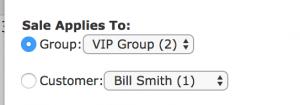
Creating a per user or group sale looks just like creating a regular sale, except there are settings that allow you to configure it on a per user or group basis.

User or Group Selection for Zen Cart Per User Group Specials

Once the sale is created, it looks like any other sale when seen by the targeted user or group.

Zen Cart showing a product on Sale

Increasing or Reducing Prices Globally in your Zen Cart

One of my clients decided to reduce prices by 5% across the board.  This kind of change is not hard to make in phpMyAdmin.  Their database prefix was “zen_” so I used the commands

update zen_products set products_price = products_price * 0.95;
update zen_products set products_price = round(products_price, 2);

If you wanted to increase prices by 5% instead, the first command would simply be

update zen_products set products_price = products_price * 1.05;

Note that this only changes the regular prices of products; products on sale or special are not changed. I’ll talk about those in a future blog post.

What does a NUC OpenCart Change look like?

To further explain the grievance I posted last time about OpenCart NUC changes and how harmful they are to the ecosystem around OpenCart, I though it would be useful to post an example.   We’ll look at how the language file is loaded in Better Together for OpenCart.

The first version of Better Together for OpenCart was created to work with OpenCart 1.5.  The controller for this module is created in

admin/controller/total/better_together.php

which defines the object

class ControllerTotalBetterTogether extends Controller

Here’s how a language file was loaded in that version:

$this->language->load('total/better_together');

But in OpenCart 2.0, this changed!  The code had to be refactored as follows:

$this->load->language('total/better_together');

Again, in OpenCart 2.3 – supposedly a minor version update – the code changed again, because the file system was restructured:

$this->load->language('extension/total/better_together');

Not only that, but the class itself had to be renamed – and this happened in a minor version update.

class ControllerExtensionTotalBetterTogether extends Controller {

Language loading did not change in OpenCart 3.0, but many, many more things did.  The net result is that to fully support my open source contribution, I would have to maintain separate, different copies of all the code files for Better Together for

  • OpenCart 1.5
  • OpenCart 2.0
  • OpenCart 2.3
  • OpenCart 3.0

Such a shame.  A little discipline – or technical project management – could have prevented this situation from arising.


OpenCart and the NUC problem

NUC – not upwardly compatible – means you’ll have problems using older code and data on a newer version of the code.  Most software developers take great pains to avoid NUC changes, or at least document them carefully so that upgraders won’t be stung by them.

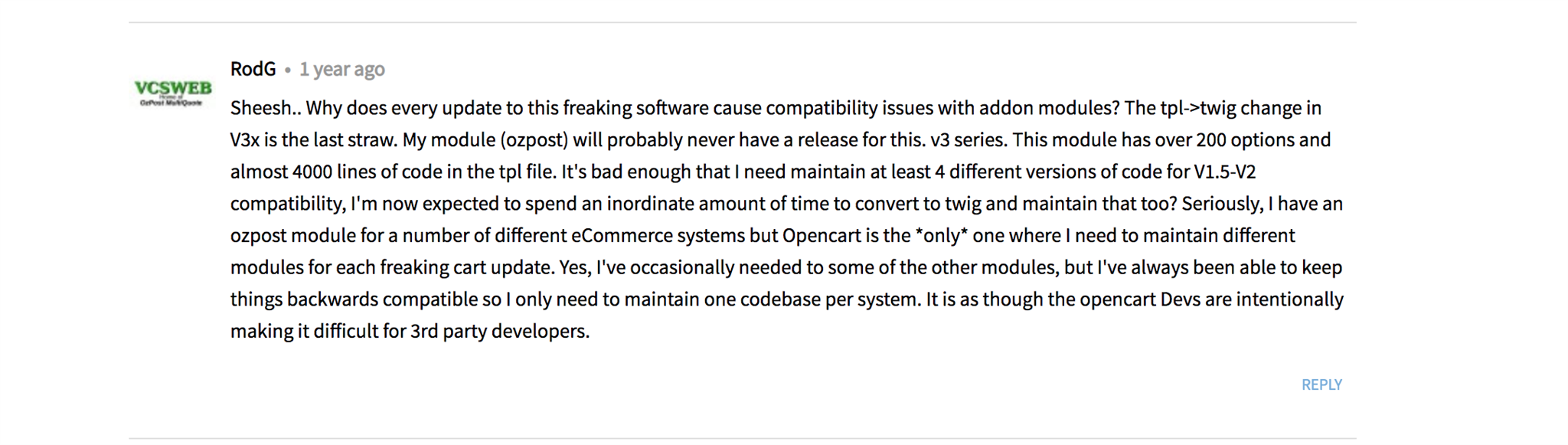
But not OpenCart, sadly.  This post from long time Zen Cart developer RodG sums it up:

I initially created Better Together for OpenCart to work with OpenCart 1.5.  I came back several years later, and found that it needed significant changes for OpenCart 2.0.  OK – then came OpenCart 2.3, and again, significant changes were required, and the old code was not upwardly compatible.  OpenCart 2.0 to 2.3 is a minor version number update, and there should never be a NUC change in a minor version update (per semantic versioning). Is the expectation really that I should maintain multiple copies of the source for each minor version change?  As Rod points out, this would be unique among the open source carts I have worked with.

So a few years pass, and along comes OpenCart 3, which contains – you guessed it – yet more NUC changes.  Guys, you’re killing me.  But at least there will be compelling business drivers to encourage people to do this upgrade, right?

Well, no, not really, according to Martin Boss of MultiMerch.   He says vendors considering  upgrading from OpenCart 2.3 to 3.0 face significant drawbacks and limited advantages.

So where does this leave independent software vendors like That Software Guy?  In a pretty bad spot – I am actually getting requests to support Better Together on OpenCart 1.x, because people don’t want to upgrade to 2.3, never mind 3.0.

That Software Guy gets a shoutout from Salesforce

The Salesforce folks have given me another nice mention on their blog.  They even talk about my Zen Cart to Salesforce integration, which was a nice touch.   Although I did this integration for Zen Cart, it could easily be adapted for any other cart, so I’m hoping it helps out some non-ZenCart folks too.

Zen Cart Admin Login as Customer

ALAC is a very clever mod that allows you to login to any customer cart from your admin.  It’s handy for placing orders on behalf of customers or investigating issues reported by customers during their shopping experience.

I just posted the updates for Zen Cart 1.5.5 to this mod; it’s available in the Zen Cart Downloads Area. I hope it works well for your store!

RocketShipIt Professional Services? Just call That Software Guy!

I’m pleased to announce that Mark Sanborn of RocketShipIt has chosen That Software Guy as a partner for providing custom programming.  RocketShipIt is a great solution for people who want to integrate UPS, USPS, Fedex, DHL or Canada Post into their websites without delving into the icky details of shipper APIs.  (And believe me, as a software developer and the admin of the PHP UPS API, I can confirm that the details are mighty icky.)

Want to use RocketShipIt for your next project?  Let’s work together!