 eCommerce with Zen Cart!
Zen Cart Big Upsell
 A Zen Cart™ mod which allows you to
suggest upsells on the shopping cart page and on the first page of
the checkout process.
A Zen Cart™ mod which allows you to
suggest upsells on the shopping cart page and on the first page of
the checkout process.
Note: Big Upsell is the "Checkout Candy" for Big Chooser, Big Spender, Discount Chooser and Discount Spender. If you're not using one of these modules, you don't need Big Upsell.
If you're using Better Together, look at Checkout Candy for Checkout Candy for Better Together.
If you're using Combination Discounts, look at Checkout Candy for Combination Discounts.
Relevance: Zen Cart™ 1.3.9, 1.5.x
Current Version: 1.3 (version history)
Support Thread: My commercial software is not supported on the Zen Cart forum. Please email me questions instead.
Cost: $30.00 (Note: this low price covers software only for self-installation.)

Would you like to ask me questions before buying? I'm happy to help likely purchasers make the right decision. Please use my contact form.
Installed Cost: $130.00 (Professional installation by That Software Guy)
Installation Difficulty: Moderate (Some file merging)
Installation Instructions: click here
Buy: Buy Big Upsell!
Pre-purchase questions? No problem! Just Please contact me with your question.
See it Live: Go to my test cart and add this product to your cart. You will notice that on the shopping cart page (and the first checkout page) that Big Upsell re-enforces the discount I have specified using Big Chooser.
Overview
Big Upsell allows a Zen Cart vendor an upselling opportunity at the two key decision points in the checkout process: when reviewing the cart and on the first page of checkout.Big Upsell with Big Spender or Big Chooser
Like Discount Spender, Discount Chooser, Big Chooser, and Big Spender? Wish you could re-enforce the upsell message off the product info page? Big Upsell shows your discounts on the most critical pages - the shopping cart page and the first checkout page.This is different from the marketing information provided by Discount Spender, Discount Chooser, Big Chooser and Big Spender on the product info page, since it shows all available promotions, not just ones which apply to a particular product.
Shopping Cart Page Using Big Upsell
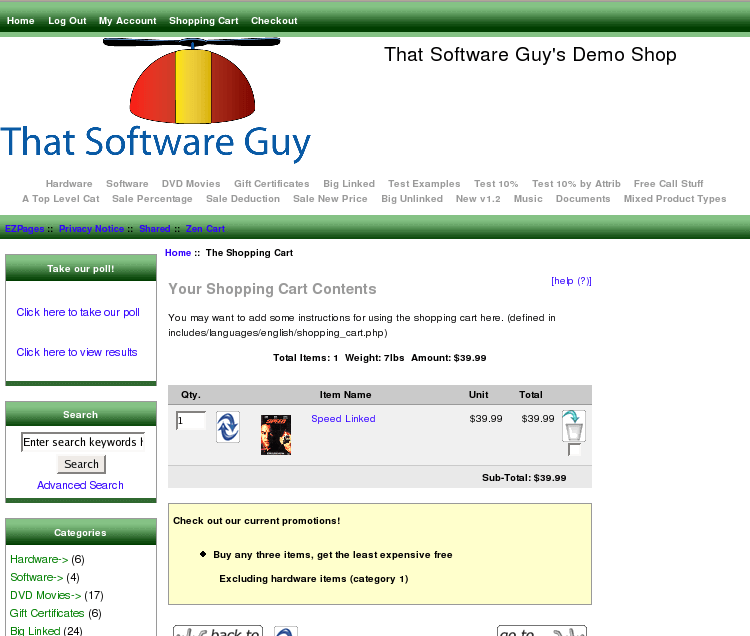
Checkout Page with Big Upsell
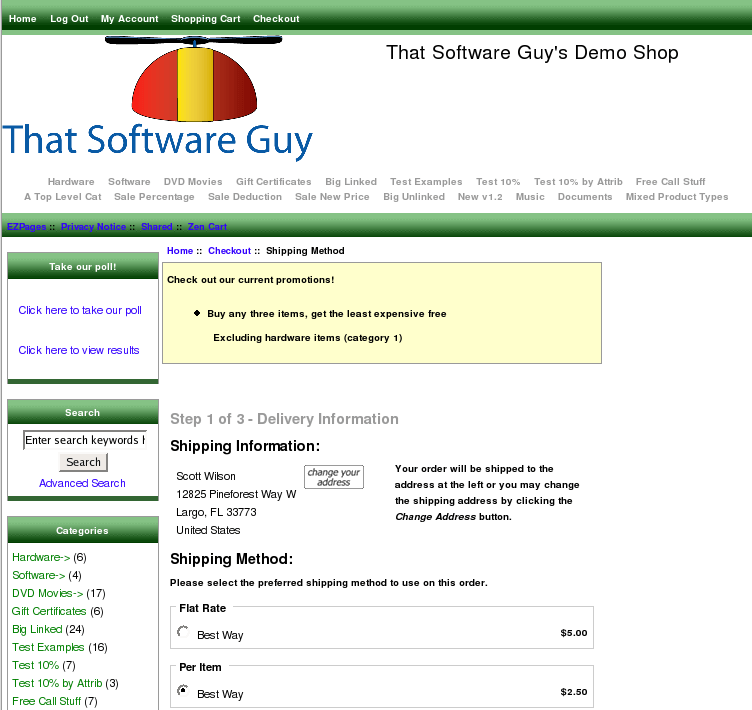
This message was produced by Big Chooser with the following discount configuration:
     $this->add_condition('Buy any three items, get the least expensive free', true);
         $this->set_support("Excluding hardware items (category 1)");
         $this->set_constraint(MINPRICE, 0.01, 2);
         $this->set_discount(MINPRICE, 0.01, 1, "%", 100);
         $this->set_negative_constraint(CAT, 1);
Here's another example from a client who offered specific products for free over certain spending thresholds using Big Spender.
Shopping Cart Page with Big Upsell
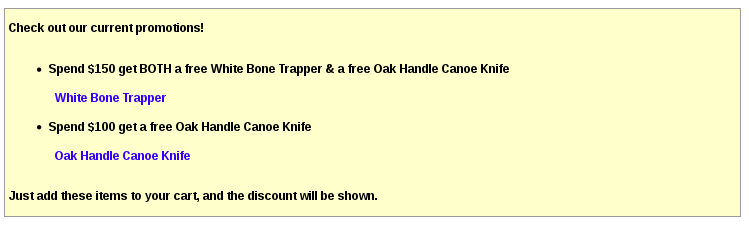
This message was produced by Big Spender with the following discount configuration:
$this->add_threshold( 150, "Spend $150 get BOTH a free White Bone Trapper & a free Oak Handle Canoe Knife", false );
$this->set_support('<a href="' . zen_href_link(FILENAME_PRODUCT_INFO, 'products_id=8208') . '">White Bone Trapper</a>');
$this->set_discount( PROD, 8208, 5, "%", 100 );

$this->add_threshold( 100, "Spend $100 get a free Oak Handle Canoe Knife", false );
$this->set_discount( PROD, 8227, 1, "%", 100 );
$this->set_support('<a href="' . zen_href_link(FILENAME_PRODUCT_INFO, 'products_id=8227') . '">Oak Handle Canoe Knife</a>');
Installation Instructions:
- Back up everything! Try this in a test environment prior to installing it on a live shop.
- Copy the contents of the unzipped folder to the root directory of your
shop.
The names of these files reflect a template name of "custom." If you are using a different template name, please change file paths using "custom" to use your template name instead. Note: If you are using Zen Cart 1.5.5 or higher, your template name will be "responsive_classic" if you have not changed it. - If you have also ordered
Discount Preview from me, you will have to merge the file
./includes/templates/custom/templates/tpl_shopping_cart_default.php
Big Upsell is different from Checkout Candy, in that Big Upsell displays all available promotions from Discount Chooser, Discount Spender, Big Spender and Big Chooser, whereas Checkout Candy tailors them to your cart contents. The information displayed by Big Upsell is what is shown in the Big Spender Discount promotional page, plus the information shown in the Big Chooser Discount promotional page. You can read about these pages in in the Promotional Pages help.
What constitutes an available discount in Big Spender or Big Chooser? For Big Spender and Big Chooser, all discounts are "available" unless
- A set_group statement was used, and you are not logged in and in that group.
- A set_coupon statement was used, and you have not entered that coupon.
Major Versions
- 1.3 - 09/18/2016 - Updated for Zen Cart 1.5.5a, add Free Gift Spender
- 1.2 - 07/19/2014 - Updated for Zen Cart 1.5.2 and 1.5.3.
- 1.1 - 09/15/2013 - Added Free Gift Chooser
- 1.5.0 - 11/06/2011 - Update to Zen Cart 1.5.0
- 1.3.9 - 4/25/2010 - First release for this Zen Cart version
- 1.3.8 - 2/16/2008 - First release for this Zen Cart version
- 1.3.7.1 - 2/13/2008 - First release for this Zen Cart version

I charge a $30 fee for Big Upsell.
Buy Now!
The fee covers software only; installation is extra if you require help.
The fee covers software only; installation is extra if you require help.