My Zen Cart Isn’t Working!

I get emails like this all the time:

  • Why did my Zen Cart stop working?
  • My Zen Cart is broken!
  • Zen Cart just stopped taking orders!

What’s the root cause?  It varies – old software, failed upgrade, hoster changes … it goes on and on.

But here’s the good news: I can fix it.  You might have to upgrade, but I can take care of that too.  Just go on my Zen Cart Support plan and I’ll get started bringing your cart back to life.

How to style the EXTRA_INFO block in Zen Cart HTML emails

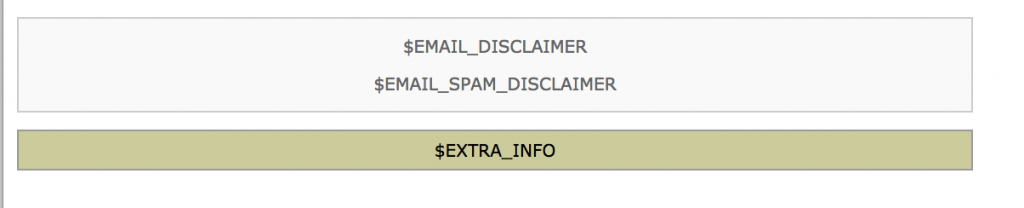
By default, if you look at the HTML emails sent by Zen Cart, the $EXTRA_INFO block is unstyled.   So it doesn’t fit in with the rest of the content, which is styled.

Fixing this problem easy.  Just modify the templates that use this variable (email/*.html) and change

$EXTRA_INFO

to

<div class="xextra-info">
$EXTRA_INFO
</div>

Then instead of this:
EXTRA_INFO fixed in Zen Cart HTML email template
you will see this:
EXTRA_INFO fixed in Zen Cart HTML email template

If you want to see a complete execution of this change, you can look at my Zen Cart 1.5.6 Pull Request to fix this issue.

Zen Cart Per User Group Specials

Many people don’t know that Zen Cart Per User Group Specials also allows you to create per user or group Sales!  (In Zen Cart, Sales are per *category* discounts, whereas  Specials are per item discounts.)

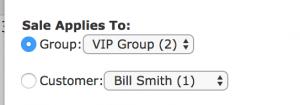
Creating a per user or group sale looks just like creating a regular sale, except there are settings that allow you to configure it on a per user or group basis.

User or Group Selection for Zen Cart Per User Group Specials

Once the sale is created, it looks like any other sale when seen by the targeted user or group.

Zen Cart showing a product on Sale

Increasing or Reducing Prices Globally in your Zen Cart

One of my clients decided to reduce prices by 5% across the board.  This kind of change is not hard to make in phpMyAdmin.  Their database prefix was “zen_” so I used the commands

update zen_products set products_price = products_price * 0.95;
update zen_products set products_price = round(products_price, 2);

If you wanted to increase prices by 5% instead, the first command would simply be

update zen_products set products_price = products_price * 1.05;

Note that this only changes the regular prices of products; products on sale or special are not changed. I’ll talk about those in a future blog post.

That Software Guy gets a shoutout from Salesforce

The Salesforce folks have given me another nice mention on their blog.  They even talk about my Zen Cart to Salesforce integration, which was a nice touch.   Although I did this integration for Zen Cart, it could easily be adapted for any other cart, so I’m hoping it helps out some non-ZenCart folks too.

Zen Cart Admin Login as Customer

ALAC is a very clever mod that allows you to login to any customer cart from your admin.  It’s handy for placing orders on behalf of customers or investigating issues reported by customers during their shopping experience.

I just posted the updates for Zen Cart 1.5.5 to this mod; it’s available in the Zen Cart Downloads Area. I hope it works well for your store!

Is your Zen Cart show Not Secure in Google Chrome?

Google has made a change to Chrome so that now sites without SSL display as Not Secure.  Is this happening on your Zen Cart?  It’s not happening to my support customers because I have fixed it for them.   If you’d like to run your business instead of your website, you should hire me to support your Zen Cart!

CSV Stock Update for Zen Cart

Lots of people have found my Quick Quantity Update mod to be useful – it ,allows a single item’s quantity to be changed with one click.

Some people need more power though – if you’re doing 100 updates, one-at-a-time is not an option. For those people, I created CSV Stock Update. Update a product’s quantity for as many products as you like, all from a CSV you created in Excel or with a text editor.